Some ideas don't come from planning things out neatly at a desk; they pop up suddenly in some swaying gap.
Since high school, I've always had the habit of recording and sharing. Later, when I went to university to study design, that habit didn't just continue—it became more and more concrete. Design requires constant digestion and absorption: the excellent cases I see day to day, the spacing I repeatedly tweak in software, and the retrospectives I distill after finishing a project all pushed me to find a suitable container to hold them.
I remember it was probably the winter of 2022, on a train heading home, when the idea became clear: I needed a place that was truly my own, a long-term knowledge base and blog. I wanted to gather back the things scattered everywhere—the design standards I'd learned, the software insights I'd figured out, the design projects I'd done one by one, and the workflows I'd gradually iterated over time. They shouldn't just stay in folders on a local hard drive or in casually created draft documents.
At that time, the underlying wish was actually very simple: I wanted a place where I could quietly put down the things I'd made with care, and then have more people see them. Once that idea settled, it became the starting point for all the tinkering over the following years.

More than three years of using Wolai
After the idea on the train settled, the first step was to find a ready-made, easy-to-use tool. Eventually, I chose Wolai, and I used it for more than three years, paying for it the whole time.
Looking back, those three-plus years were crucial to me. Wolai helped me accomplish the most core things: it let me keep writing, organize notes and projects in a structured way, and share them directly through public pages. During that time, I moved a large number of project retrospectives, design notes, and method summaries onto it, building a public knowledge base that was beginning to take shape. From what I later learned, this knowledge base was bookmarked by some excellent designers I greatly admire. When I found out, I felt very honored—it felt like you've carefully organized content, and passersby stop to flip through it and are even willing to put it in their bookmarks bar. That recognition gave me a lot of confidence to keep recording.
But in daily use, as my work habits changed, three limitations gradually began to show.
The first was insufficient room for personal customization. As a designer, I always have my own obsessions about a page's font hierarchy, margins, line height, and color rhythm. Within the fixed framework of a ready-made product, I could only make limited fine-tuning, but I always hoped the page could better fit my own aesthetic.
The second was adaptation to AI workflows. In recent years, design and development workflows have changed a lot, and AI has become deeply involved in my thinking, writing, and code ideation. I need an environment where AI can more smoothly read, write, organize, and automate flows. Based on my own experience, Wolai was still a bit bumpy when working with this way of working.
The third was about readers: I couldn't get the browsing data I wanted to see from the platform. For a publicly shared knowledge base, whether anyone is reading and which content people care about more—on a ready-made platform, it was almost impossible to see concrete data.
I left Wolai not because it wasn't good enough—it accompanied and carried more than three years of my intensive growth, and the content accumulated over those three years is itself a cornerstone. It's just that as I went along, I began to long for a more autonomous space that could grow into the shape I wanted.
Freedom and Friction: The Code Repository Phase
Since I wanted autonomy, it was natural that I tried a self-designed frontend plus code repository approach.
The basic architecture of that approach was very common: content written as Markdown files and stored in a private GitHub repository; I designed the frontend interface myself; after pushing changes locally to the main branch on GitHub, a build and deployment would be triggered automatically. For hosting, I initially used Cloudflare's free hosting.
When it first worked, the whole approach really did bring the freedom of being in control. The interface structure, the contrast of dark mode, the typography details of large headings on mobile—all adjusted by myself; content changes were clearly visible in Git history, and I could check the diff at any time.
But once it actually ran as a daily writing tool, real-world friction followed one after another.
The first thing I found troublesome was maintaining images and videos. Design articles usually mix text and images, interspersed with a large number of interface screenshots and animated GIFs. When inserting media files in Markdown, I needed to carefully check relative paths, which was quite tedious to maintain.
Next was the obstacle to AI participating in collaboration. To have AI process articles and media, it first had to access the repository: pull it locally, or establish a cloud connection. For me, just getting the materials to AI added another layer of preparation.
The bigger problem was on the access side. When deployed with this approach, readers in China had trouble accessing it. If the web page can't open reliably, then no matter how refined the visuals are, they lose their meaning.
Finally, mobile operation was difficult. For me, this workflow almost said goodbye to the possibility of easily updating content on a phone.
If readers are interested in some of the explorations from that stage, I also left pages such as learn-codex and harness-learn at the time.
Looking back at that approach, on the surface it saved the effort of building a backend and managing a database, but in reality it shifted the pressure to the publishing side—every time I changed a sentence, the process felt like doing a miniature software release. Content writing should be light and quick, and this friction made me realize that writing and publishing had to be freed from a complicated process.
After the New Main Site: First Make Publishing Light
The turning point came after I finished designing and developing my new main site.
I decided to rebuild the blog, with a very clear core goal: complete the early system design thoroughly and make daily content publishing light.
Once the goal was clear, progress became agile. I probably spent less than two hours settling the visual framework for the entire new blog design—this only refers to the time spent drawing the interface and typography in design software; later code implementation, data import, and maintenance are not included.
After entering the development stage, many interaction details and small widgets were adjusted while building in Codex. Directly feeling spacing and font texture while writing code is often more intuitive than repeatedly reasoning on a static canvas.
Looking back now, this tech stack addressed several specific needs respectively:
Astro handles server-side generation of reading pages: Astro generates the reading content pages on the server side.
React handles local interactions: responsible for the local interactions needed on the page, embedded as components on demand.
Tiptap handles rich text editing in the backend: since I no longer wanted to deal with local file paths, I needed a modern editor where I could write in the browser at any time. Tiptap outputs structured content well and supports custom appearance.
Now it seems that this tech stack lets content consumption, local interaction, and content editing each play their own role, making everything clean and clear to manage.
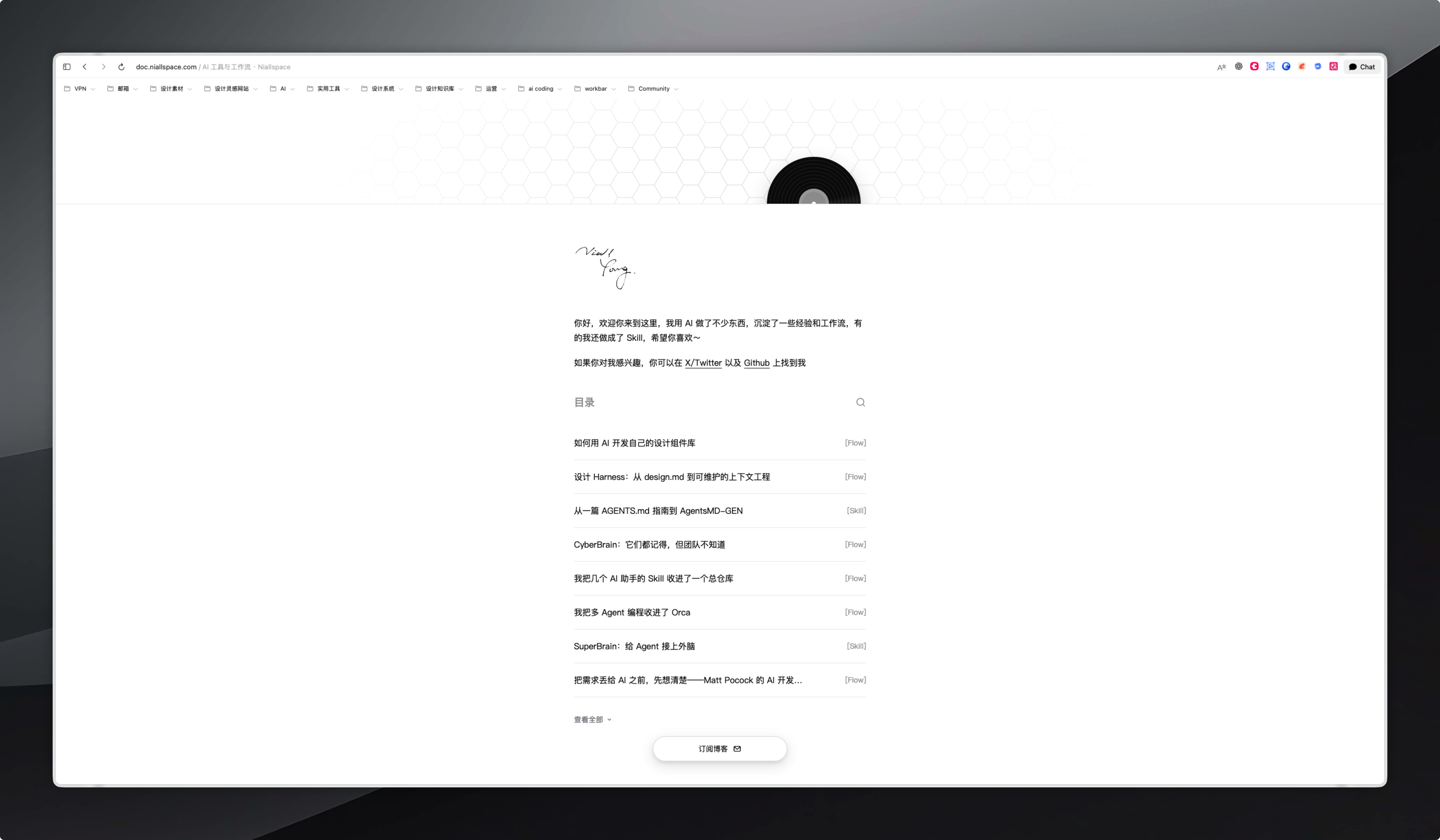
My Own Backend and the Long-Term Account
With the technical division of labor in place, the next core task was to build a backend of my own. From my perspective, the backend only answers a few specific questions during daily writing.
Where to write?
A backend editor where I can type as soon as I open the browser. Built on Tiptap, the interface stays clean; no need to open a local terminal, and no need to manually align image tags in Markdown syntax. Log in to the backend, drop the cursor, and start typing.
Where is the stuff stored?
It's stored in a file-based SQLite database, with data access in the code layer handled through Drizzle.
For my current personal content volume, a single-file database is already enough to hold articles, categories, and statistical records. It doesn't require separately maintaining a standalone relational database service on the server, and the system is also configured with regular automatic backup scripts, saving a personal site a whole set of operational burdens.
How are multiple sections organized?
I have many different kinds of content I want to write: some lean toward design thinking, some toward tools and cutting-edge technology, and some record AI workflows.
I use one backend to manage multiple sections uniformly. Currently there are four public sections: blog, harness, codex, and ai, all mounted under the subdomain doc.niallspace.com, naturally separated from one another by URL paths.
Besides these four sections open to the public, I also have a protected work showcase site, work, located under the main domain niallspace.com, which can only be viewed after logging in with specific authorization. Four public sections plus one protected site share one backend, one database, and one object storage setup, eliminating the jarring feeling of switching back and forth between different backends.
Do I still need to redeploy the site after publishing an article?
No. In the current system, content publishing and code updates are two separate processes.
After writing an article and clicking publish, the backend updates the article and its publishing status in the database, and the frontend then reads and displays it; there's no need to rebuild the site for this article.
Only when features or styles change does the site code need to be updated. The deployment script installs the new release version, backs up the existing database, performs necessary data migrations, and checks the running status after restarting the service. With them separated, writing an article no longer requires going through the code release process again.
The Cost of Self-Hosting
Having my own backend really does bring a sense of control, but as a design engineer, I also understand its cost:
Self-hosting means credential security, server configuration, regular data backups, and runtime environment maintenance all become my own responsibility. This is the long-term engineering responsibility one must bear in exchange for freedom. If you enjoy the building process, these are the joys of exploration; but if the core purpose is simply to write, then this operational work becomes a real drain on energy.
How Content Comes In: From Detours to Interface Division of Labor
This part involved the most debugging during the site-building process. Faced with old articles and images scattered across external tools in the past, how to move them in gracefully directly determined whether the new site could really be put to use.
The Initial Detour
At first I thought very directly: select all and copy in Wolai, paste into the backend editor, then have AI build a feature that automatically uploads images to OSS when encountered.
But when dealing with content containing a large number of long articles and images, this upload method failed repeatedly. Relying solely on the browser clipboard to move high-density text and images is an unstable detour.
Switching to Document APIs
After hitting a wall, I turned to the API route.
Now the backend's process for importing old articles is very clear: paste a document link into the backend input box, and the backend identifies the source by domain name and calls the corresponding parsing module.
The core logic is: read the underlying structured data of the document system through the API. Grab block-level data such as titles, quotes, lists, and images, clean it in memory, and map it to my own database format.
The prerequisite for automated transfer is smooth authorization and supported formats:
On the Wolai side, configure the corresponding developer token to read the data of the corresponding document tree.
On the Feishu side, relying on self-built app credentials, first resolve the entity behind a standalone document or Wiki node, then pull content in segments.
The reason for specifically integrating with Feishu is that Feishu is currently my core workbench for daily writing and AI collaboration; article ideation and initial organization often unfold in Feishu documents. Previously, when trying to process images and media in Wolai through MCP, the experience wasn't smooth enough, which also prompted me to shift the center of my deep writing workbench to Feishu. Since the content grows in Feishu, the blog backend needs the ability to connect with it.
Image Handling
Converting body text is relatively smooth, but image handling needs to be more rigorous.
Image links in note-taking platforms often carry temporary signatures with expiration times. If stored directly in the database, the images will fail once the signature expires.
In the current import process, when the backend parses an image, it proactively downloads the original image bytes, verifies the real size and media format, and generates a unique identifier with the section path based on the image content.
Before writing to storage, the system first checks whether the same record already exists in the same section. If it has already been imported, it directly reuses the existing address; if not, it formally writes to Alibaba Cloud OSS and registers it. Temporary links in the body text are also replaced with stable addresses pointing to OSS. This reduces dependence on the source platform's temporary links and also allows identical images within the same section to be reused.
Handing Links from Feishu to Codex
With the server-side API capabilities in place, I encapsulated the import process into a command-line tool, placed in the repository as an npm package under the name @niallspace/blogspace-cli. The package also includes an operation guide for the model to read, so the AI clearly knows how to call it and what rules to follow.
It takes on the import capabilities the server already has: reading authorized document content, retrieving images and placing them into my own storage, assembling a draft, and then returning a preview link.
My current usage is: send the document link to Codex in a Feishu conversation, have it call this tool to finish the preparation, and then return the preview link to me. I click to open the preview, check the paragraphs, layout, and images, and after confirming everything is correct, I manually publish it in the backend; if the content was changed in the meantime, I need to preview it again.
What gets handed off is repetitive labor: fetching, cleaning formats, downloading and placing images, and assembling a draft. What stays with me is judgment: whether to publish this piece, when to publish it, and what it should look like. I provide the document link, and the public publishing step must be personally confirmed by me in the browser.
Import Does Not Equal Publish
In designing the import mechanism, I set one rule: import does not equal publish.
The CLI and API provided by this site for AI can, at their highest permission level, only generate drafts pending review for specifically authorized sections.
Public publishing must be personally confirmed by an administrator in the browser backend. Check the paragraphs and layout in the preview interface, and publish after confirming everything is correct; if the article content version changes during the preview period, the system will indicate a conflict and refuse to publish.
Hand the repetitive fetching and typesetting to the API and AI, but keep the gatekeeping of public publishing to myself. Beyond the publishing process, there is another layer worth considering: what others see when an article is found by search or forwarded.
After the Article Leaves My Site
Once the publishing path is working, there is another often-overlooked detail: once an article leaves this site, when it is found by search or forwarded by readers, what others see at first glance is often no longer the body text itself, but the information I provide to search and sharing platforms.
In the system, this layer of information is divided into two layers: text and images.
For the text layer, the core idea is "first have a reasonable default, then leave a place where it can be manually changed." Each article by default uses its own body title and excerpt as the description used for search and sharing; if a piece of content needs a more concise presentation in cards, I can also write a separate title and excerpt for it. The page also provides the section suffix, canonical link, and publication time, so search and sharing platforms clearly know where to point and what to display. The page also outputs a structured article information block, providing the author, publication time, modification time, and accompanying image to search engines, so they understand more clearly what kind of article this is. The backend also leaves a place to preview roughly what search results and sharing cards will look like.
For the image layer, it's mainly the automatically generated sharing cover. The sharing cover is automatically typeset and generated by the server at a size of 1200×630. Visually, it continues the site's own light-colored design, using the same font standards, brand identity, and section tags, paired with black-and-white geometric shapes, combining the article's title and excerpt.
The four public sections each have their own visual graphic language: blog is a record-like set of concentric circles, codex is a strict grid of squares, harness is connected nodes, and ai is radiating lines and triangles. In terms of layout logic, the title automatically adjusts font size according to text length and displays at most four lines, while the excerpt shows at most three lines, with anything beyond directly truncated so as not to crowd out the geometric shapes and footer. In implementation, Satori typesets the layout into SVG, and then Resvg converts it into a standard PNG image.
It should be made clear that this is a code template automatically typesetting according to rules, not each article calling generative AI to draw an image; this sharing cover is also not the same as the illustrations in the body text.

In daily use, I can also upload my own cover image separately for a particular article, and the system will prioritize the custom image; if I no longer want it, I can restore the automatic cover at any time. Automatic covers make it easier to keep the whole site's style consistent and save the effort of re-laying out images for each article, but the template-based approach leaves relatively limited freedom of expression for individual pieces; custom images can fit the specific content of a particular article, at the cost of having to make each one yourself. How to choose between the two is a choice that can be adjusted article by article.
At the system boundary, automatic covers are dynamically generated server-side, while custom covers go through media storage and are written to the cloud. The public automatic cover interface only serves published, undeleted articles in the four public sections; draft covers can be previewed in the logged-in admin area and are not made public as a result.
This is all information I proactively provide to search and sharing platforms. I can set the title, summary, and image I hand over, but how the platforms ultimately display it is still up to each platform itself.
Now that this layer is clear, next comes the older question: is anyone actually visiting?
Has anyone been here: data, email, and RSS
Once content flows steadily into the backend, the next thing to solve is the feedback loop: is anyone visiting? And if people finish reading and want to keep following along, how do they get updates?
Visit statistics
All of the blog's visit statistics are recorded server-side: when a request reaches the server, the server logs the visit while processing the page. The statistics logic filters out common crawler bots and browser prefetch requests, and the administrator's own visits can also be excluded from the statistics.
The system uses a visitor cookie to distinguish visits and aggregates them server-side: the cookie stores a random visitor identifier, and the server hashes it to distinguish and count visits.
The admin area can now show trends by 7 days, 30 days, or a specific article, as well as the current section's active email subscriber count and cumulative RSS requests. I also understand that recorded unique visitors are only an aggregation of identifiers within a network environment, not an absolutely precise real-person count, and that cumulative RSS requests merely reflect fetch frequency. Only by keeping these understandings in mind can the data serve as an objective reference.
Email subscription
Email subscription provides a return channel for updates. After readers enter a valid email on the page, the subscription takes effect immediately, covering the four public sections on the site. The protected work section is not included. The sending channel is handled by an asynchronous task queue together with Alibaba Cloud DirectMail.
When a new article in a public section is first published, it enters the notification flow, while later fixes to typos, image swaps, or minor paragraph tweaks in old articles will not trigger another mass email, avoiding disturbing readers.
RSS
Besides email, the system also provides a globally unified RSS feed. RSS requires no email address or account registration on this site; just add the subscription link in a reader. The feed only includes formally published, undeleted articles in the four public sections (blog, harness, codex, ai), returning the most recent 50 summaries plus links. The protected work section likewise does not appear in the public feed.
Statistics reveal reading trends, email establishes update reminders, and RSS is left for those who are used to reading in a reader. With these channels, there is a quiet loop between writing and reading.
If you also want to have your own site
Many designers or design engineers may also have the idea of building a site in their minds, weighing ready-made platforms against self-built solutions over and over.
Whether to build your own site depends on examining your current real needs:
Are the layouts and whitespace of ready-made tools already clearly limiting your visual expression?
Is the current publishing workflow too cumbersome, with every edit interrupting your writing rhythm?
Is it hard for existing platforms to let AI smoothly help you process and move content around?
Do you want to understand your site's basic traffic and establish your own subscription channel?
If your existing notes or platform lets you write and share smoothly, and the pain points above haven't really blocked you, then ready-made tools are good enough, and there's no need to build a site just for the sake of building one. I wrote continuously on Wolai for more than three years, and that accumulated content was the foundation for what I later continued to build.
If you've thought it through and want to start, I suggest starting with a small closed loop:
Pick a real article with images as a sample. Find an actual article with mixed text and images to expose layout and image-loading problems as early as possible.
Build the list page and the reading page. First lock down the core text visuals and reading layout.
Get one most basic pipeline working end to end. Focus on getting "edit/import — generate draft — front-end preview — confirm publish" working end to end, so articles display properly in the list.
Check two basic experiences. Test in a real network environment: whether target readers can access it stably, and whether images in articles load properly.
Gradually fill in features according to actual needs. Once the basic pipeline is smooth, then add as neededserver-side statistics, email notifications, sharing presentation, or multi-section organization.
If you need a concrete tech stack as a reference, you can use: Astro for server-rendered content reading pages, React for local interactions, Tiptap for backend editing, SQLite for storing content accessed via Drizzle, and Alibaba Cloud OSS for media files. Then use a CLI to handle document import, let AI return draft previews, and have a human confirm publishing in the admin area; sharing covers use automatic templates while retaining the option of custom images.
This solution fits my own habits; you don't have to copy it wholesale, just pick and choose according to your actual situation. At the same time, face up to the long-term maintenance responsibility of self-hosting: credential management, server configuration, and data backups all require ongoing care. However, if you really like my blog site, I have open-sourced the whole thing; you just need to add your own configuration (OSS bucket, Feishu or Wolai account, etc.) and you can use it directly. The project repository address is:GitHub - Niall-Young/blogspace-framework: an open-source blog framework based on my blog site

Looking back to the winter of 2022 on a train home, that idea was initially just to find a suitable place to properly put the things I'd made, hoping to be seen. Over the years, I've experienced the convenience and limitations of ready-made tools, the friction of the code-repository approach, and little by little built up my own backend. Now I have a corner that better matches my own aesthetics and work rhythm.
The original intention of sharing hasn't actually changed; it's just that now I can more confidently decide how they are presented.
1 likes
You can like once today