Found some nice icons online, but frustrated that you can't extract their prompts yourself? Or is the image-prompting approach really inconvenient, and also inconvenient to share and use?
Through my exploration, I found a workflow with an iterative question-based image generation prompt template. Basically anyone can do it, with no technical threshold, as long as you have patience.
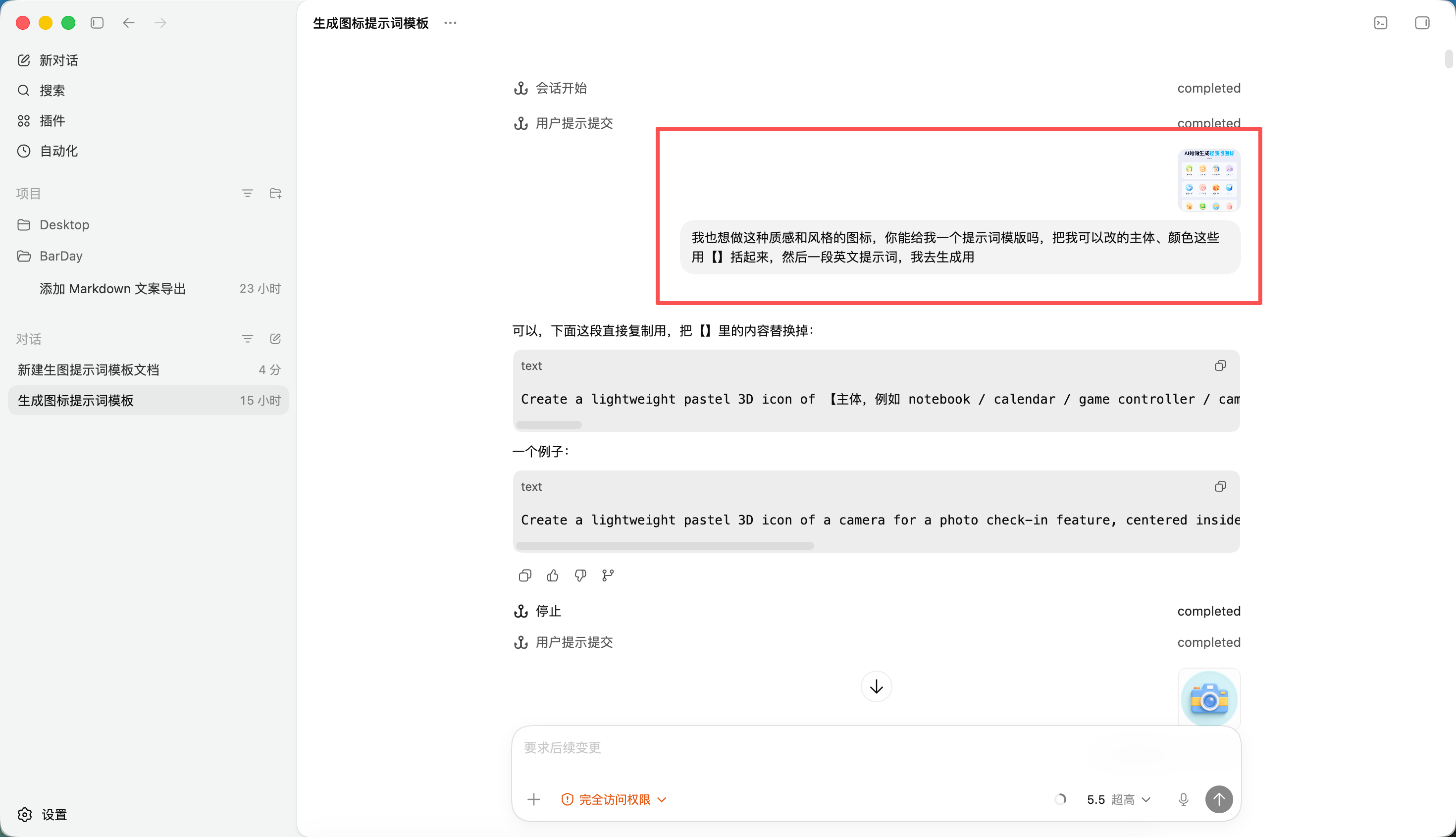
A deliverable prompt template
I understand that a truly deliverable prompt template must meet at least three conditions:
Its structure is stable. For example, information such as subject, composition, lens, material, lighting, color and background each sits in a fairly clear position.
Its variables are clear. Which places can be changed and which places should not be touched are best marked directly with 【】.
It has been tested. It is not just about producing one good image in the current conversation, but testing again in a new conversation and still maintaining the general direction.
Obviously, we need a continuous loop of testing and feedback. In theory, it is possible to let the AI iterate on its own—this is very much like an Agent loop (if you are interested, you can check my Harness notes:https://harness-learn.pages.dev/). But this is still not great. Through my practice, I have found:
AI is only good at output; when it comes to multimodal input, it is far less precise than humans. It often thinks things are the same (because the subject and the rough color scheme match);
It is not economical. Multimodal models are more expensive and, compared with humans doing the comparison, also take more time.
Below, let us introduce the entire workflow
Find references and hand them to the AI
The first step is simple: first find the reference image you want to learn from. You can go to Huaban, Xiaohongshu, or X to find reference images you like and want to distill into a template. But note here that the reference image must not be too vague. You should at least know what you want to preserve. For example, do you want its low-saturation color scheme, its centered composition, its pixel-level material rendering of the product, or that soft but layered lighting?
Here I will use Codex as an example. Of course, you can use any other AI tool. Next, hand the reference image directly to Codex and have it do one thing first: analyze why this image works, then based on the analysis generate a testable prompt.
In this step, do not just ask it to "write a prompt for me"; it is best to explicitly require it to break down the image. Because what we want is not a bunch of pretty adjectives, but to let the model know which information needs to be fixed.
请分析这张参考图,拆出主体、构图、色彩、材质、光影、镜头语言、背景复杂度和整体风格,然后生成一条适合用于生图测试的完整提示词。提示词要具体、可执行,不要只写抽象风格词。The benefit of doing this is that Codex will not just give you generic words like "high-end feel, cinematic feel, exquisite," but will try to translate the specific features in the reference image into a prompt structure.
Prompt testing
After getting the prompt, I will put it into ChatGPT's image generation capability to test. Of course, you can also use Jimeng, Kling, or any AI you want to use for image generation. However, my personal experience is that different AIs need different prompts to achieve the effect of the same image, so prompts are strongly model-dependent.
However, there is one small detail to note: for each test, you must start a new conversation. Opening a new conversation for every test is meant to prevent context contamination. Do not run many versions consecutively in the same conversation; otherwise, the earlier references, failed results, and revision requests may all affect your judgment of the prompt's true stability.
If the test result is unsatisfactory, do not say things like "this one is no good, tweak it again." That sentence basically carries no information, and Codex can only guess.
My approach is to copy the image produced by the test back into Codex, then explicitly tell it: exactly how this image differs from the reference image, and why it is different—for example, using the following feedback dimensions:
Feedback dimension | Not recommended phrasing | More recommended phrasing |
|---|---|---|
Composition | The composition is off—please revise it. | In the reference image, the subject occupies about 70% of the frame. In the test image, the subject is too small, leaving too much empty space. The camera needs to move closer, and the centered composition needs to be strengthened. |
Color | The colors don't look good. | The reference image uses a low-saturation, cool gray tone, while the test image leans toward high-saturation orange, making it look more like an advertising poster. The saturation needs to be reduced, and the area of warm colors needs to be decreased. |
Lighting and shadow | The lighting doesn't look sophisticated | The reference image has soft side lighting with clear light-dark gradation; the test image's lighting is too flat, and the material lacks a sense of volume, so lateral soft light and clearer highlight edges need to be added. |
Style | Not like the reference | The reference image leans more toward realistic product photography, while the test image turned into an illustration feel. It is necessary to reduce the hand-drawn feel and enhance realistic materials and lens depth of field. |
You'll find that the more specific the feedback, the easier it is for the next round of prompts to converge. That's because what Codex needs is not emotional judgment, but actionable information about differences.
这次测试图和参考图主要有三个差异:
1. 参考图主体更大,几乎占据画面中心区域,测试图主体太小。
2. 参考图的色彩更克制,偏低饱和冷灰,测试图颜色太鲜艳。
3. 参考图是柔和侧光,测试图光线太平,材质没有层次。

请基于这些差异重写提示词,优先修正构图、色彩和光影,不要改变原来的主体方向。
Extract the template once it's stable
When you feel the test results are fairly stable, you can move on to the final step: have Codex distill this prompt into a template.
The key here is to enclose the replaceable parts in 【】. For example, 【subject】, 【primary color】, 【background】, 【material】, 【aspect ratio】, 【use case】. As for the content that determines style stability—such as composition method, lighting structure, camera language, and texture requirements—try to keep it.
请把这条已经测试稳定的提示词提炼成一个可复用模板。把可替换的内容用【】括起来,例如【主体】、【主色】、【背景】、【材质】、【画幅比例】。请保留影响风格稳定性的固定描述,例如构图、镜头、光影、材质质感和画面复杂度。A distilled template might look like this.
为【主体】生成一张【画幅比例】的视觉图。画面采用【构图方式】,主体占据画面中心主要区域,背景保持【背景复杂度】。整体色彩以【主色】为主,饱和度克制,避免过度鲜艳。材质表现为【材质】,需要真实、细腻、有清晰的高光和阴影层次。光线采用柔和侧光,保留自然景深和产品摄影感。整体风格接近高质量商业视觉,不要插画化,不要过度装饰。Note that this is just an example. A real template must be distilled from the prompts you previously tested and stabilized, not by applying some universal format out of thin air.
However, one thing to note: I personally have a habit of testing once more at the end after refining it into a template. This is because after changing the complete prompt into a template, the variable positions may affect stability.
Summary
This method may seem a bit slow, but it solves a key problem: don't let image generation become a fresh lottery draw every time. The reference image provides the direction, Codex breaks the direction down into language, ChatGPT tests the results, and your own feedback converges the prompt step by step. In the whole process, the most important thing is not the tools, but whether you can clearly explain "what is wrong."
There are 2 main details I want to explain further at the end:
Start a new conversation for every formal test to avoid context contamination;
Feedback must be specific. Don't just say "not good" or "change it again." You need to explain the specific differences and also explain why it is different from the reference image.
Once these two points are done well, the prompt is no longer just one-off text; it can become an image generation template that can be delivered, reused, and continuously iterated.
If you are interested, you can also look at quite a few prompt templates that I reverse-engineered myself and collected:Image Generation Prompt Collection
50 likes
You can like once today