Starting from where AGUI actually works, a codebase-backed design harness and deterministic checks, this argues it suits existing-system iteration and dynamic modules, and should be built incrementally from component tests to avoid an overbuilt harness.
In current explorations of AI-assisted design and development, many teams attempt to generate usable interfaces directly from PRDs through prompt engineering. However, in real-world implementation they often face problems such as out-of-control layouts, inconsistent component styles, a lack of edge-case states, and endless revision loops where the large model confidently makes things up.
The key to solving this problem is not finding a more powerful model, but 3 things:First, clearly understand the applicable boundaries of AGUI and avoid forcing it into unsuitable scenarios; second, build a deterministic design harness for AI; third, use a progressive construction order to prevent over-engineering the harness. Based on past practice in B2B product design and AI engineering workflows, I have organized a complete AGUI implementation methodology.
Clarify the applicable boundaries of AGUI
AGUI is not a silver bullet that can "replace designers and frontend engineers with one click." In many complex or strongly visual-driven scenarios, its actual performance is not great. Before building the workflow, its capability boundaries must be clearly defined. Based on my own practice, I believe AGUI is currently best suited to the following two scenarios:
Dynamic interface rendering for conversation flows and rich-text content (Generative UI in Stream): For example, in an AI ChatUI, when the large model outputs structured data, to-do lists, approval cards, or data charts, it is no longer limited to plain text or Markdown, but directly generates an interactive HTML/component module; similarly, this also applies to interactive business blocks generated on demand in smart document editors;
Iteration requirements for existing enterprise internal systems (1 → N): In B2B admin systems that already have mature design specifications, stable page skeletons, and ready-made business component libraries, for iteration requirements such as adding fields, adjusting filter conditions, and adding sub-flows, AGUI has an extremely high hit rate and usability, and can directly shorten the path from requirement to launch.

Naturally, AGUI also currently has clearly unsuitable scenarios. The most serious is brand-new projects from 0 to 1. For brand-new projects starting from 0 to 1, it is strongly not recommended to expect AGUI to directly generate deliverable final interfaces. The main reason is that visuals and styles are unlikely to meet expectations. At the 0 to 1 stage, there is often a lack of established brand visual language and reference to real-world context, so pages generated by large models easily fall into a "cookie-cutter template feel" or rough details, making it hard to meet high-standard visual experience requirements. If you must use AGUI, I believe its more correct positioning at this time is "interaction and process validation"—used to quickly explore business flows, sort out information architecture, and validate basic functional logic. It must never be treated as the final visual deliverable.
Accumulating from basic components to business components
After clarifying the positioning of "focusing on existing-system iteration and dynamic modules," the next core is the underlying infrastructure. The upper limit of AI-generated interfaces depends on the completeness of the underlying component library and design specifications. In the AI era, component libraries and design specifications are no longer just documents for designers and frontend engineers to read, butthe underlying infrastructure of the design harness—they provide the model with deterministic layout structures, Design Tokens (spacing, border radius, color variables), and general control constraints.
However, this does not mean simply copying component libraries from major companies such as Ant Design and Arco Design. There are some details that everyone needs to pay attention to.
Actively accumulate business components
Having only atomic-level basic components such as Button, Input, and Modal (such as native shadcn/ui or Ant Design) is far from enough. In complex B2B iterations, if AI is asked to assemble business modules from scratch using basic components every time, not only is token consumption huge, but interaction logic is also extremely prone to errors.
As the business accumulates, teams must distill high-frequency scenarios into business-level component specifications, for example:
Person/organization selector: includes search, department tree switching, and display of selected personnel;
Complex tables and advanced filters: include multi-condition combinations, dynamic addition/removal of filter items, reset, and saved views;
Step-by-step forms and approval flow node configuration.
The above are just examples; the specifics still need to be considered based on actual business scenarios. The current examples only cover B-end scenarios, but the same applies to C-end. In fact, in some scenarios the C-end workload can even be less than the B-end, because domestic C-end scenarios are more custom-designed, and componentization focuses more on interaction behavior logic rather than visuals, which actually makes it easier for AI to perform, and the Harness can be made thinner and lighter.

Using the Codebase as the single source of truth
Teams with different levels of R&D maturity have different levels of acceptance for AI-generated outputs: aggressive teams allow PMs or designers to directly pull the production repository, create a new branch, and submit a PR; conservative teams prefer to have AI generate standalone HTML prototypes or module fragments, which frontend developers then integrate into the real project. However, regardless of which stage a team is at, there is only one core principle:The codebase must be the single source of truth for business and specifications.
If the team adopts the production-code-direct-output mode, AI should directly reference the real component paths and interface types within the repository; if the team adopts the HTML delivery mode (including ChatUI cards or standalone prototypes), AI must never be allowed to freely write native CSS. Instead, a lightweight HTML stylesheet and standard component fragment library should be extracted from the existing real business code, and AI should assemble within this limited scope.
Not recommended to use design.md
In my previous article Design Harness Practice Exploration, I analyzed this issue in detail: plain-text design.md (or lengthy natural-language specification documents) are not suitable as the core constraints for AI-generated interfaces.
Natural language inherently has ambiguity and is easily forgotten by models in long contexts. In contrast, structured code definitions (such as TypeScript Props interfaces, CSS variable files, and standard HTML template fragments) are themselves the most precise specifications. Having AI read component definitions in the codebase is far more reliable than having it read thousands of words of Markdown design documentation.
Core execution pipeline
To prevent the model from "getting it done in one step" when facing complex requirements—which leads to scattered attention and missed details—the entire AGUI workflow is broken down into six serial deterministic stages:
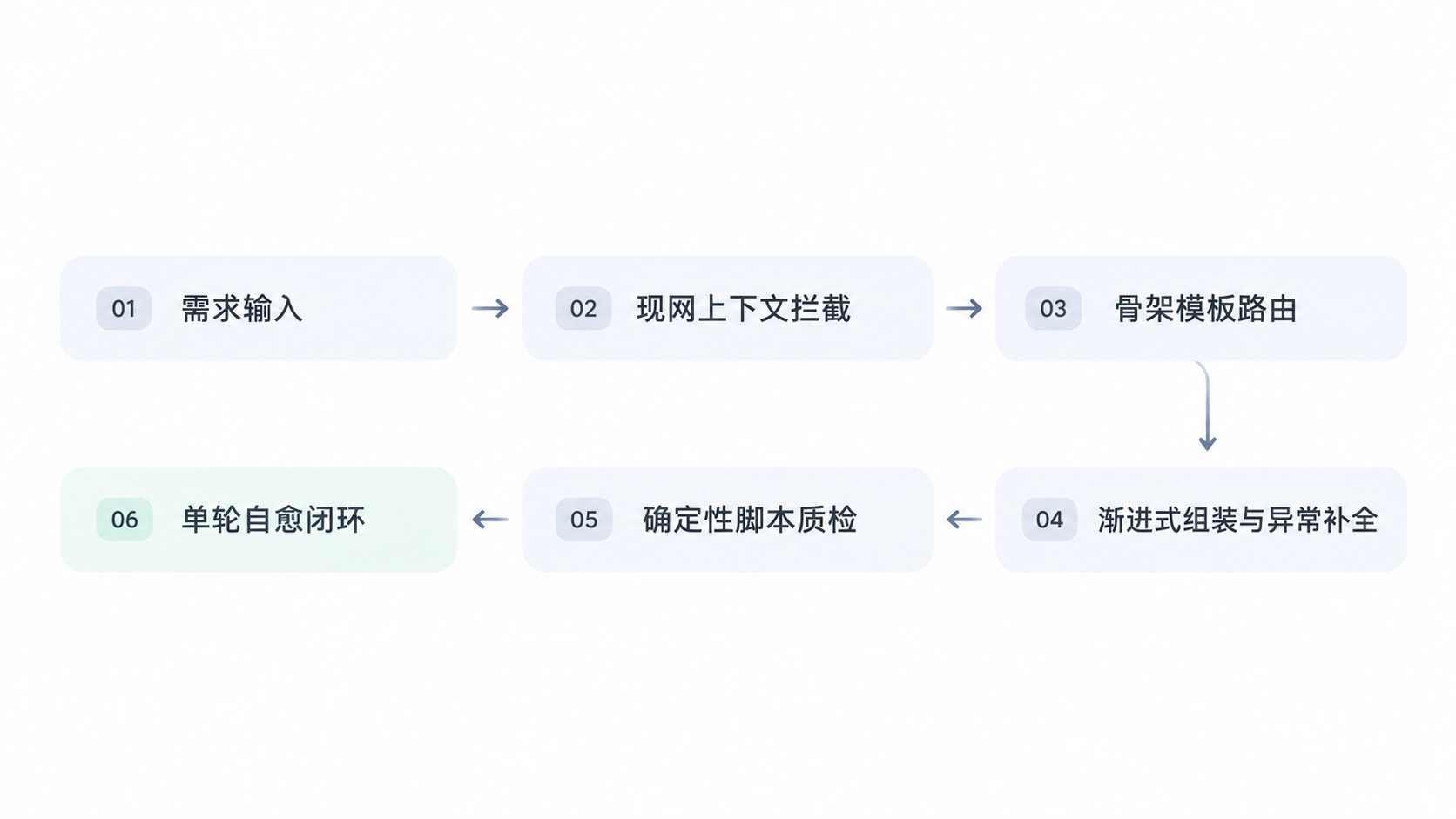
Stage 1: Structured requirement input
This is generally completed by the PM or an upstream requirements Agent to converge the early-stage requirements. Of course, the entire module can also be merged as a pre-step of the AGUI process, outputting a PRD or Spec document containing business goals, field definitions, and operation paths; this will not be elaborated further here.
Stage 2: Live environment context interception
This is a step that is easily overlooked in actual implementation but has the most significant impact on accuracy improvement. Precisely because AGUI is best suited for iterative development on existing systems, after receiving the PRD, the system should proactively perform a process interception: require the initiator to provide a screenshot of the current business module online or the target page URL, and have an Agent automation tool (such as Playwright / Puppeteer) take a screenshot and capture the current DOM structure tree. The purpose of this step is to let AI clearly understand "what existing environment the new feature is growing in," avoiding the generation of isolated pages disconnected from the existing system.
Stage 3: Page skeleton template routing
The macro layout of B-end systems is highly convergent—it is nothing more than classic patterns such as "top navigation + sidebar + main content area," "two-column comparison," and "left-right split tree structure." Teams should extract these classic layouts in advance based on design mockups or production code into standard skeleton templates. AI combines the business type from Stage 1 and the live structure from Stage 2, directly matching and selecting the most suitable skeleton from the template library, rather than recalculating grid and Flex layouts.
Progressive assembly and exception state completion
After the skeleton is selected, the AI generates code strictly in the order of "structure first, then components, and exceptions last":
Output the HTML semantic skeleton: establish block divisions and container hierarchy;
Inject components and stylesFill the corresponding slots with business component tags and Design Tokens;
Complete frontend exception and edge statesThis is the dividing line between a "demo toy" and a usable engineering artifact. AI must proactively reason through and generate, according to business rules, the DOM structure and toggle logic for empty states, data loading skeleton screens, API error prompts, and form validation error states.
Deterministic Script Checks and the "Single-Round Correction" Principle
Generating code is only half the job. How to verify output quality at low cost and with high reliability determines whether the workflow can truly be put into daily use. I also have some insights on this part.
Replacing LLM Self-Review with Deterministic JS Scripts
For the checking mechanism, I strongly recommend prioritizing pure JS scripts (such as AST parsing, DOM traversal scripts, and headless browser computed-style detection) for mechanical checks, rather than having another LLM "describe what it sees" or "read through the code looking for issues." This approach has two major advantages:
Zero hallucination and high determinism: verifying whether tags are closed, whether unauthorized hardcoded color values (Hex/RGB) are used, whether element spacing conforms to the 4px/8px grid, and whether interaction attributes (such as
disabled、aria-*), and the accuracy of the JS script is 100%;Extremely low latency and zero token cost: Routine checks of page styles, layout overflow, and basic interactions can be completed by local JS scripts in milliseconds, with speed and stability far exceeding large-model inference.
One round of inspection and correction, strictly guarding against infinite loops
When the JS script scans out an error list (for example:检测到 2 处硬编码颜色值、表格筛选区缺少空状态占位符), you should not directly throw the error to the user; instead, feed the precise Error Log back to the generation model to trigger one automatic correction and a second recheck.
But here is a crucial piece of engineering experience:It is recommended to limit automatic correction to 1 round (no more than 2 rounds at most). Because mainstream large models today, when facing multiple consecutive error-correction instructions, very easily fall into the trap of “over-reflection”—in order to comply with the instruction to “find errors and modify them,” the model begins to modify code that was originally correct, and may even break the overall layout just to fix an edge-case style, ultimately falling into an endless loop of revisions. With the current code-understanding ability of models, together with the error line numbers precisely located by the JS script, a single round of precise correction is already fully sufficient to solve more than 90% of specification-deviation problems; if after a single round there are still a very few complex anomalies, handing them directly to manual fine-tuning is the most cost-effective choice.

The "Reverse Law" of Build Order
Finally, I'd also like to share how I built this AGUI engineering system. In fact, many teams easily fall into a misconception during implementation: strictly following the aforementioned AI runtime order, trying to first build out the global architecture, all rules, and the underlying infrastructure, and only then testing the interface generation effect. I believe that in actual engineering, the order in which teams build this system should be exactly the reverse of the AI runtime execution order.
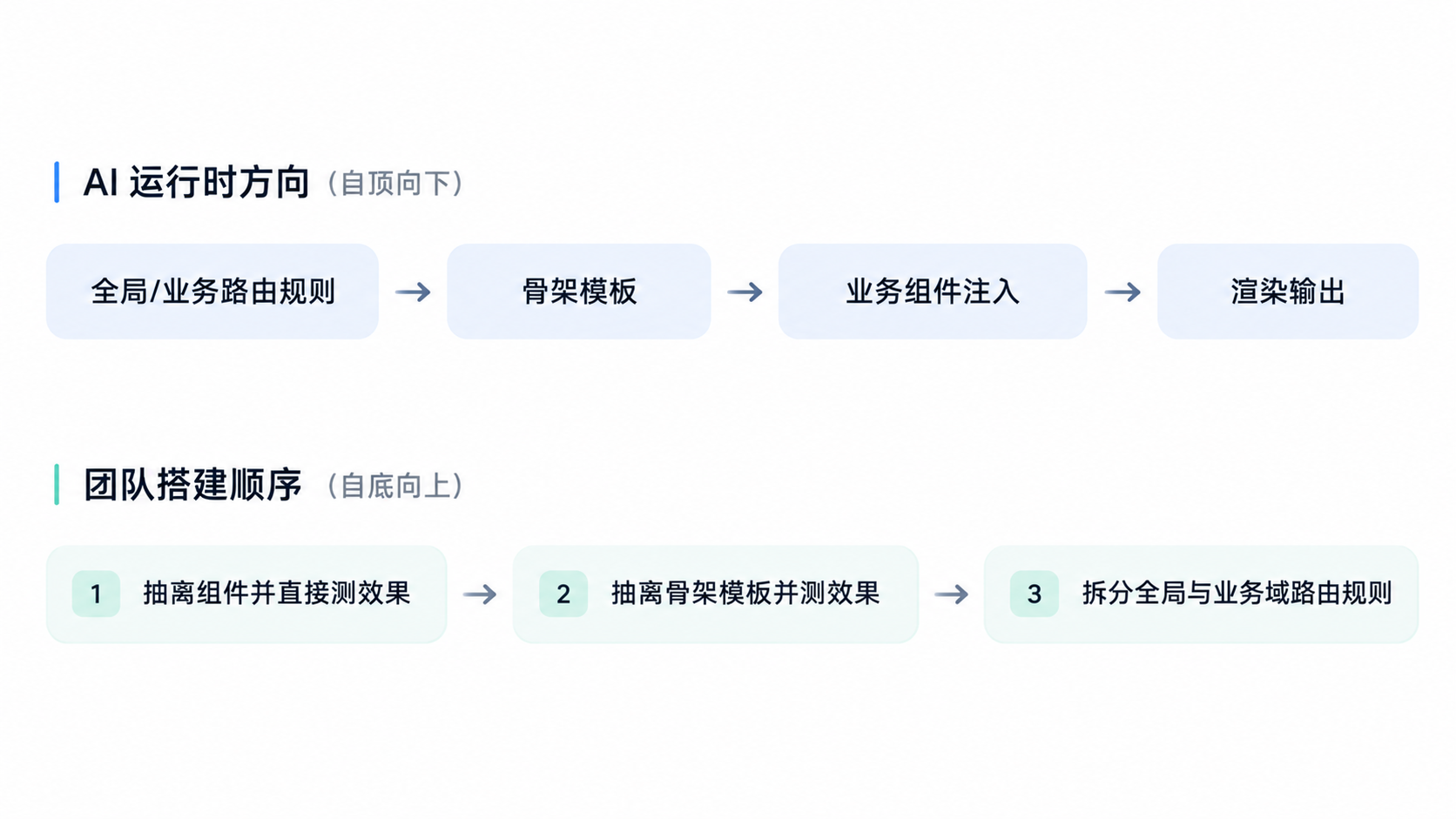
The reason I strongly recommend this "reverse, progressive" build path is backed by two extremely practical engineering considerations:
Frontend is a domain with strong visual feedback; only by "seeing the effect first" can you tune at low cost: The quality of frontend and interface generation is visible to the naked eye. If you first extract a few high-frequency business components and feed them directly to AI to test the generation effect, you can intuitively see within minutes where the component Props are misaligned and where the styles collapse, and fix them immediately; if you hold back and start writing from the underlying rules, it often takes weeks before you see the first page, and the debugging chain is too long.
Leverage the generalization ability of modern large models to prevent the Harness from becoming too heavy: Today's mainstream large models already possess strong layout understanding and code reasoning capabilities, and do not need exhaustive, hand-holding restrictions. If you start by formulating rules in exhaustive detail from the bottom up, you easily fall into over-design and make the Harness extremely bloated and heavy—the result is not only a surge in maintenance costs, but excessive rigid rules instead constrain the model's own performance.
Therefore, the healthiest implementation rhythm should be a three-step approach of small quick steps:
Step one: extract components first, and test directly. Pick out the 3 to 5 most painful high-frequency business components in the business, extract them into clean code snippets, and directly have AI generate partial modules combined with simple requirements and verify the visual and interaction effects;
Step two: then extract templates, and test assembly. Once component-level generation is stable, extract common page outer frames into skeleton templates, and test the combined effect of "template + component";
Step three: split rule routing by business domain. As more business lines are integrated, by no means stuff all rules into one huge global prompt; instead, through a business domain routing mechanism, decouple global common rules (such as basic grid, common interaction specifications) from specific business domain rules (such as precision validation for finance modules, permission display for approval modules), load them on demand, and keep the context lightweight and precise.
Summary
A truly implementable AGUI workflow is essentially a balance among "scenario restraint", "progressive engineering infrastructure", and "large model semantic generalization capability":
Maintain restraint in applicable scenarios, focus on conversational flow interaction modules and existing B-side iterations, and do not force 0 to 1 visual perfection;
On the build path, do the opposite, evolving gradually from components to templates and then to business domain rule routing, using visible feedback to avoid Harness over-design;
Leave component specifications, layout skeletons, and quality validation to deterministic codebases and JS scripts; leave requirement understanding, context matching, and boundary state reasoning to large models; and lock down the lower bound with live-network interception and single-round closed loops.
Only when AI is placed in suitable scenarios and moderately, precisely constrained to run within engineered tracks can generative interfaces truly move from concept demos to everyday productivity.
0 likes
You can like once today