The methods we've learned so far can already help us develop and iterate on projects. But as projects grow larger, even with one Agent per task, context can easily become too long. Is there a way to solve this and get daily tasks done faster?
Of course there is—just use Subagents!
What Is a Subagent
I covered Subagents in great detail in "Harness Notes." If you're interested in its specific engineering and logic, you can check out that article: https://doc.niallspace.com/harness/posts/07-subagent. Simply put, it lets an Agent break a large task into several smaller tasks and assign them to more Agents to complete separately, so the context of different tasks can be split smaller, making context explosion or declining AI attention less likely.
However, Codex's Subagents differ from the Claude Code Subagents introduced in the article in some details, which can be summarized as follows:
Before GPT 5.6 appeared, Agents in Codex would not proactively summon Subagents. Even now, without enabling Ultra reasoning intensity,they will only summon a few specific Subagents in certain tasks.;
Codex's Subagents have no hierarchy limit, which means Subagents can continue to summon Subagents, unlike Claude Code, which restricts Subagents from further delegating tasks;
Codex does not have the
swarmmode of Claude Code or Kimi Code,After actively enabling this mode, you can have Subagents complete the same work in parallel. For example, you can give it 1000 English articles to translate into Chinese; it can summon more than 20 Subagents at the same time, each Agent translating one article, and once one article is completed, another Subagent is added, continuing until the translation of these 1000 articles is finished. Codex does not directly support this feature, because Codex's Subagents can already run in parallel.
In short, when using Codex's Subagents, we need to explicitly request their creation in the prompt; otherwise, Codex will not proactively create them for us.
Subagent applications
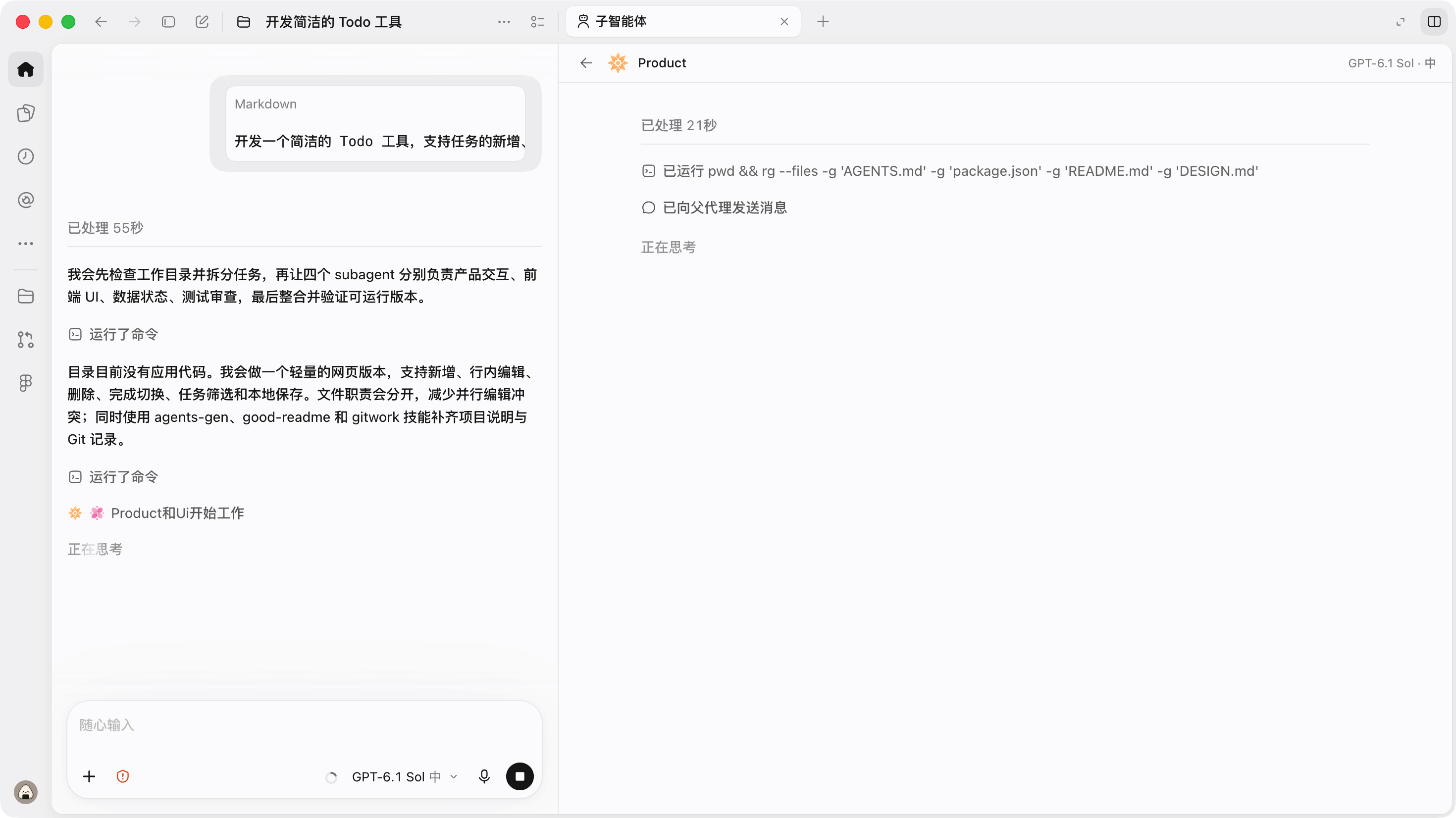
As mentioned above, we need to proactively specify the use of Subagents in the task, unless we enable the expensive Ultra reasoning intensity. Therefore, we can clearly define the division of labor among Subagents in the prompt, as well as how they run and cooperate. For example, a development task can be written like this:
开发一个简洁的 Todo 工具,支持任务的新增、编辑、删除、完成状态切换和本地持久化。请先拆解开发任务,并召唤多个 Subagent 并行工作:分别负责产品与交互设计、前端 UI 实现、数据与状态逻辑、测试与代码审查;各 Subagent 完成后汇总结果,由主 Agent 负责整合代码、解决冲突并完成最终可运行版本。During actual execution, we will see the working status of Subagents in Codex; clicking on it lets us view the specific execution process, as shown in the figure below.
Next step
The biggest feature of Subagent is that it supports parallelism and context isolation in Codex.
Therefore, we can leverage this advantage to perform testing, acceptance, inspection, and other work in isolated context environments, or to execute tasks in parallel like the translation task mentioned above, greatly improving efficiency.
For example, in the next chapter, we will use a brand-new mode combined with Subagent to implement prompt optimization and reverse-engineering engineering work.
0 likes
You can like once today