"Adding a tool, only adding a handler" — the loop doesn't need to change; new tools just get registered into the dispatch map.
Only one tool: bash
I remember mentioning in some other article that Claude Code originally was just the Claude model paired with a Bash tool (I can't remember which article it was, haha). But as the goal grew more complex, CC is now far from being as simple as having just one tool.
You might say, isn't a powerful model paired with an omnipotent Bash just as capable of brute-forcing results? But the reason a Harness is so important is exactly the higher efficiency and space. More tools aren't bloat—they're for better companionship and fewer errors. After all, everyone knows the more you say, the more you err :)
Global view: tool dispatch

If you compare with the flowchart in the previous article, you'll find that the previous article's flow is fully preserved (LLM call, stop_reason check, message append). The only change is in that 1 line of tool execution:run_bash() replaced with TOOL_HANDLERS[block.name]() table-lookup dispatch.
Adding a tool to the Agent only requires two things:
Define the tool: add an entry to the
TOOLSarray describing itRegister the handler: add a mapping to the
TOOL_HANDLERSdictionary
How it works
From 1 tool to 5 tools
Previously there was only a bash tool, now it's expanded to 5 at once, so there's a problem: how does the AI know which one to use? Actually, we can tell from the code structure:
TOOLS = [
    {"name": "bash",       "description": "Run a shell command.", ...},
    {"name": "read_file",  "description": "Read file contents.",  ...},
    {"name": "write_file", "description": "Write content to file.", ...},
    {"name": "edit_file",  "description": "Replace text in file once.", ...},
    {"name": "glob",       "description": "Find files by pattern.", ...},
]
We won't dig into technical issues like the tools' implementation functions, but from here we can see that tools also adopt the same progressive disclosure as the Skill introduced earlier—only the name and description are shown, letting the AI know which tool to use when it hits a problem, and then it looks at how to use it.
Multiple tool calls
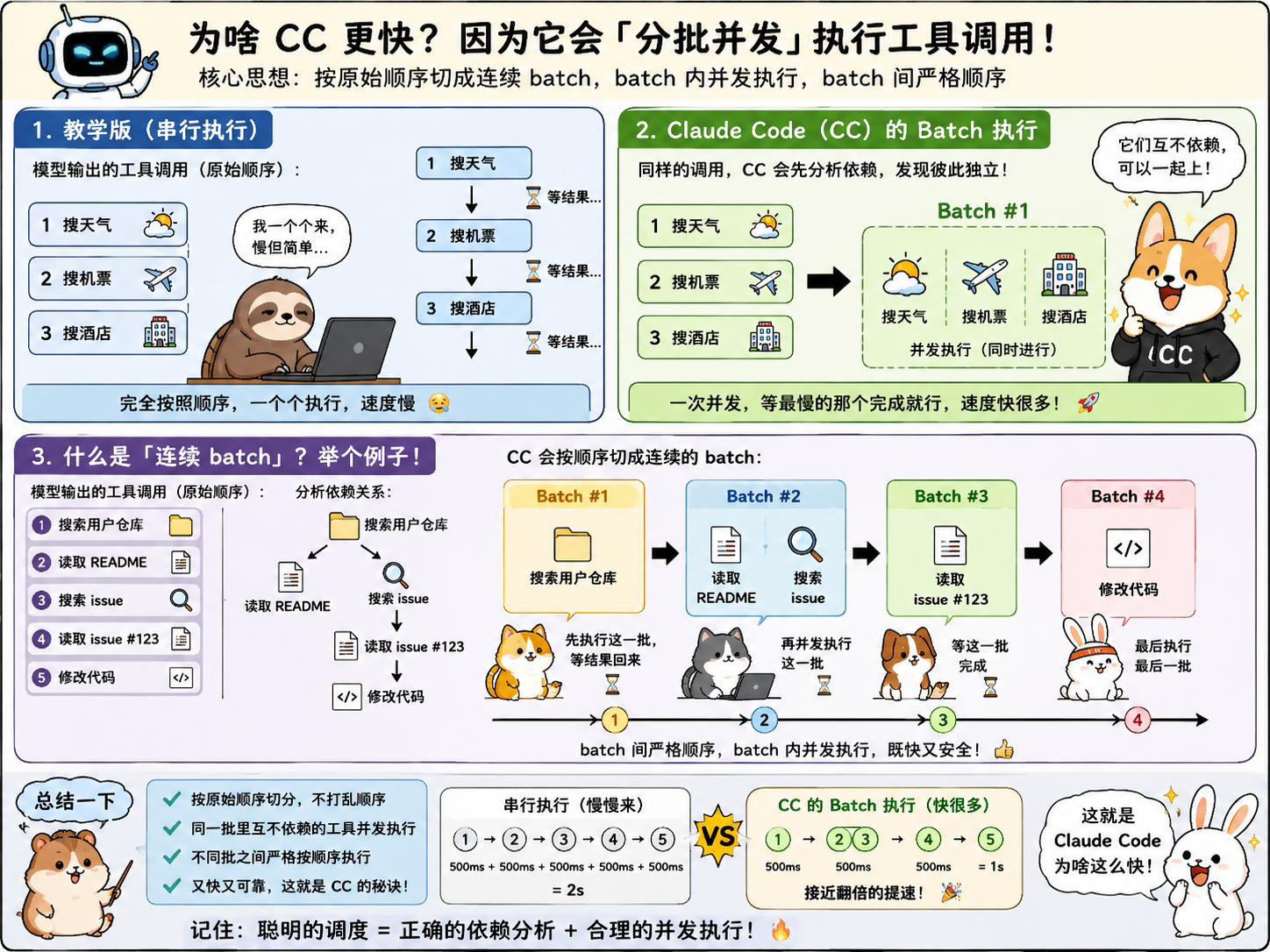
The model can return multiple tool_use at once. The teaching version executes them one by one in original order. But as the original text says, CC's handling here is more complex: it splits into consecutive batches in original order, and within a batch it runs parallel calls for tools that are concurrency-safe, rather than serially one by one as we'd understand it. You don't need to understand the technical logic here—just know that this simple version can be serial, while complex, advanced Agents parallelize to save time.
But there's one situation to pay extra attention to. Let's give an example—suppose we have this flow:
Search the user's repos
Read the README
Search issues
Read issue #123
Modify the code
Obviously we can see that splitting directly into 5 parallel steps is problematic—the later steps can't run in parallel with the first step, because they depend on it.
So how does CC handle it? It does it this way: a hybrid form with both serial and parallel streams—that is, "concurrent within a batch, sequential across batches." In other words, the first step runs in one batch; after it completes, the second and third steps run in another batch; after that, steps 4 and 5 run sequentially in batches.
If you find this hard to understand, let's use a comic to explain it clearly.
82 likes
You can like once today