"Check permissions before executing a tool" — the permission pipeline decides which operations require approval.
In the previous article, the Agent we built had 5 tools. One of them — file tools — is protected by safe_path but bash is unrestricted. Tell it to "clean up the project" and it might execute rm -rf /.
Security cannot rely on trusting the model; it must rely on code — making decisions before the tool executes.
Solution

The loop we designed in the previous article is kept entirely intact.
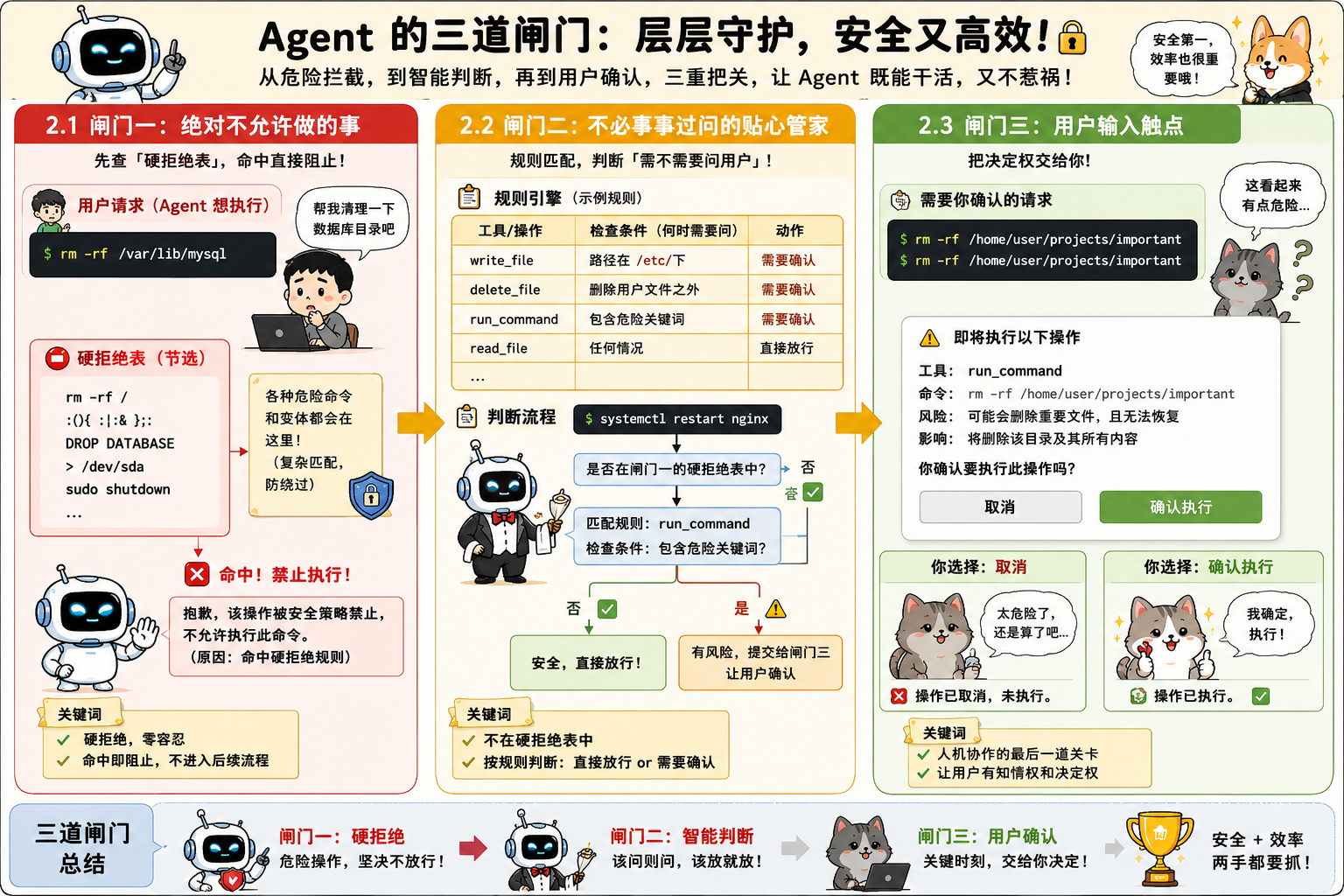
The only change is inserting check_permission() before tool execution — each tool call passes through three gates in a fixed order: hard denial first, soft asking second, and if neither hits, it is allowed through.
What does that mean? Simply put:
Gate | Function | After a hit |
|---|---|---|
1. Deny list | Operations that are always forbidden ( | Reject directly, do not execute |
2. Rule matching | Operations that depend on context (writing outside the workspace, | Handled by gate 3 |
3. User approval | After gate 2 hits, pause and wait for user confirmation | The user decides to allow or deny |
Of course, there is another case: none of the three hits, and it executes directly. Most everyday operations take this path.
Seeing this, do you suddenly understand where that prompt asking you to agree to something comes from when you use codex and cc?
How it works
Here we explain these three "gates" in detail.

Gate one: things that are absolutely not allowed
You wouldn't want the Agent operating bash to delete all your databases, would you?
So this requires gate one. It has a hard-deny table; it checks first, and on a hit returns a block message. (Simple string matching is not a reliable security mechanism; command variants and shell expansion can bypass it, so in real-world deployments there will be more complex approaches.)
Gate two: the thoughtful butler who doesn't ask about everything
Gate two is like a thoughtful butler. It does rule matching — describing "when the user needs to be asked." After all, asking you about every single item interrupts efficiency; you'd have to keep watching, which is quite annoying, isn't it? That's why gate two exists: each rule specifies a tool and check conditions.
If gate one does not disallow a call request, and gate two thinks it's fine and perfectly safe, then it lets it through directly. If gate two thinks it's a bit dangerous and I need to ask the user, then it submits it to gate three.
Gate three: the user input touchpoint
Gate three is that thing you always see in CC, Codex, and many other tools asking whether you allow something, waiting for you to agree to execute this command. But to be honest, none of these tools currently do a good job on user-friendliness; most people asking doesn't help, they can't understand it at all, and just click agree...
Comic explanation
To make it easier to understand, once again I used AI to make a little comic explaining this part.
80 likes
You can like once today