"An agent without a plan just goes wherever it ends up" — list the steps before starting, and long tasks are less likely to miss items.
The problem
Give an Agent a complex task: "Rename all Python files to snake_case, then run the tests and fix the failures."
The Agent starts working, changes 3 files, runs a test, finds 2 failures, and starts fixing them. As it fixes, it forgets the original goal was "rename to snake_case" — the test failures have absorbed all its attention.
The longer the conversation, the worse it gets:Tool results keep filling the context, diluting the influence of the system prompt. In a 10-step refactor, after completing steps 1-3 it starts improvising, because steps 4-10 have been pushed out of its attention.
The solution

Keeping the minimal hook structure from the previous chapter, focus on the newly added todo_write Tools and the reminder mechanism.todo_write itself does no actual work—it cannot read files or run commands; it just gets the Agent to clarify its thinking before acting. In addition, a counter was added to the loop: if it goes 3 consecutive rounds without calling todo_write a reminder is injected, using AI to check whether the Todo needs updating or should be reviewed again.
How it works
First, let's talk about tode_write. In plain terms, this is the task list we use each time we operate the Agent. For example, when you use codex and work on complex tasks, there is a list on the right side that gets completed step by step.
Actually, just from what this thing does, we can infer that it is essentially a list with state, stored in the memory of the current process, used to display progress.
TOOLS = [
    {"name": "bash",       ...},
    {"name": "read_file",  ...},
    {"name": "write_file", ...},
    {"name": "edit_file",  ...},
    {"name": "glob",       ...},
    # s05: 新增一条
    {"name": "todo_write", "description": "Create and manage a task list ...",
     "input_schema": {
         "type": "object",
         "properties": {
             "todos": {
                 "type": "array",
                 "items": {
                     "type": "object",
                     "properties": {
                         "content": {"type": "string"},
                         "status": {"type": "string", "enum": ["pending", "in_progress", "completed"]},
                     },
                 },
             },
         },
     },
    },
]

TOOL_HANDLERS["todo_write"] = run_todo_write
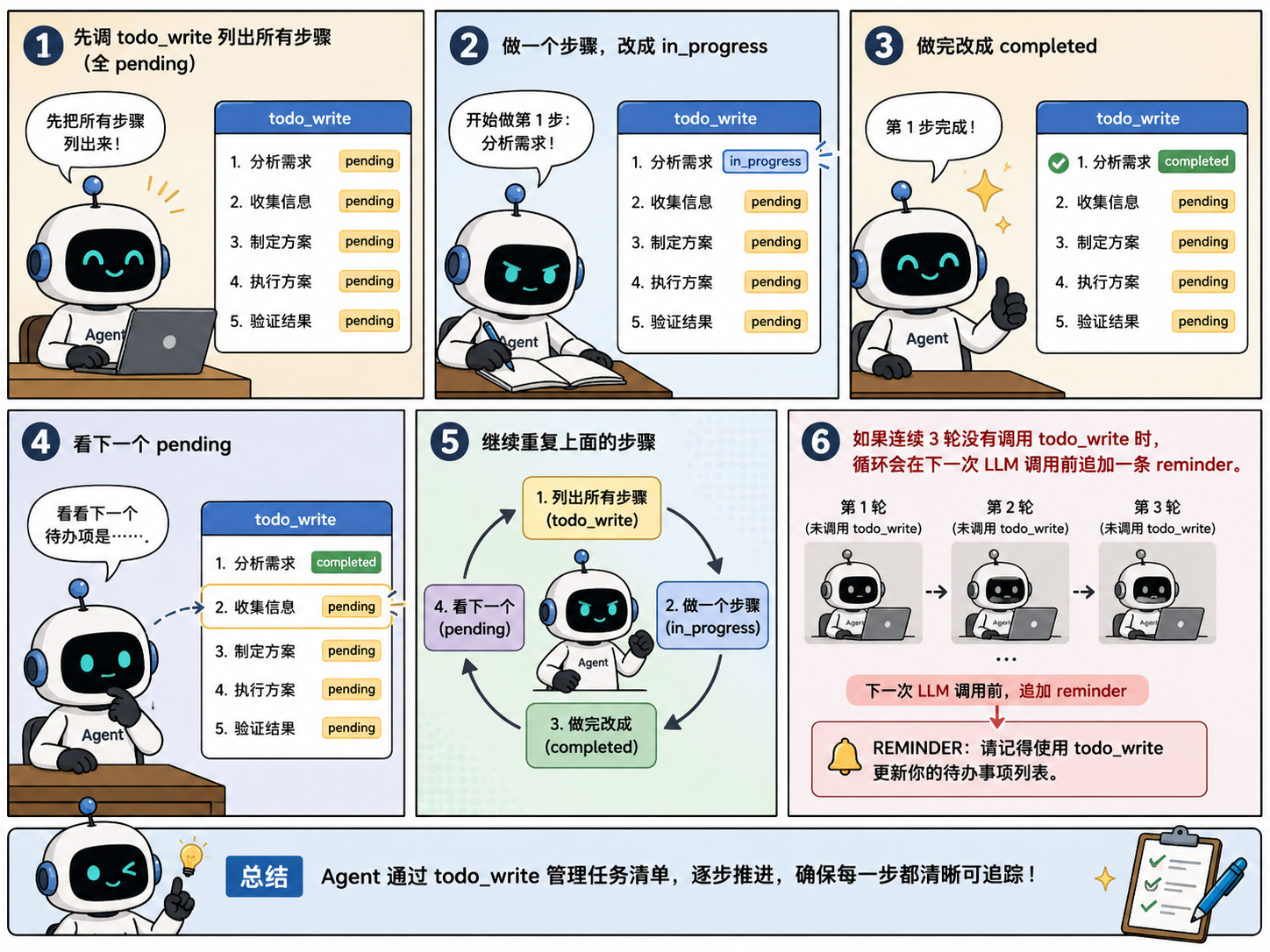
Then let's talk about the nag reminder that reminds the AI. In teaching, it is very simple: its logic is that as long as the Agent's loop goes 3 rounds without calling todo_write it will be triggered, automatically injecting a reminder to make the Agent go get the todo list again; if an update is needed, it will update, and even if not, it will be re-added to the context to prevent the Agent from forgetting. Note that CC does not do it this way; it is actually quite complex, which we will briefly discuss later and introduce in detail in the subsequent Task system section.
In summary, a typical flow after the Agent receives a task:
First call
todo_writeto list all steps (allpending)Do one step, change to
in_progressAfter finishing, change to
completedLook at the next
pendingContinue repeating the above steps; if there are 3 consecutive rounds without calling
todo_write, the loop appends a reminder before the next LLM call.
How CC does it
Two task systems coexist in CC (tasks.ts:133-139):
TodoWriteA simple list tool whose data is maintained in memory in AppState. The teaching version is also kept in process memory and cleared after exit.
Task SystemFile persistence, dependency graph, concurrency locks, ownership
We won't expand on this further here; this part will be introduced specifically in the subsequent Task system chapter, as it is a fairly complex module.
23 likes
You can like once today