Load when needed, don't stuff everything into the prompt" — inject via tool_result, not into the system prompt
In the Skill introduction section, we covered progressive disclosure; here we'll explain it in detail.
The problem
Your project has a set of React component conventions, a SQL style guide, and an API design document. You want the Agent to automatically follow these conventions. The most direct idea is to stuff them all into the system prompt:
SYSTEM = (
    f"You are a coding agent. "
    + open("docs/react-style.md").read()       # 2000 行
    + open("docs/sql-style.md").read()         # 1500 行
    + open("docs/api-design.md").read()        # 3000 行
)
A 6500-line system prompt. Every time the Agent calls the LLM it carries these documents—whether it's changing a CSS color or fixing a SQL query. 99% of the content is irrelevant to the current task, wasting tokens for nothing.
The solution
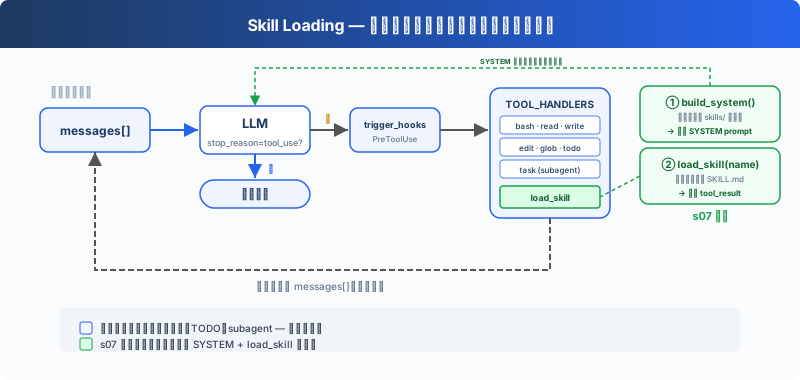
Here, we keep the previous minimal hook structure,todo_write and the sub-Agent; this chapter focuses on the newly added load_skill tool. At startup, the skill catalog is injected into the SYSTEM prompt; at runtime, one more tool is registered to load the full content, spending tokens only when used.
Simply put, it's made into 2 layers, which is the progressive disclosure logic from before: what's injected every time is only the skill's name and Description, and the rest of the content is injected only when it's needed.
Layer | Location | Timing | Cost |
|---|---|---|---|
1. Catalog | system prompt | Injected at startup (harness scans skills/) | ~100 tokens/skill, carried every round |
2. Content | tool_result | When the Agent calls load_skill;SKILL.md can guide subsequent read_file/bash calls for on-demand access to additional resources | ~2000 tokens/skill, on demand |
How it works
PreviouslySkillintroduced that each skill has a subdirectory containing a SKILL.md file, and said it will definitely include name+Description; here we explain why.
Injecting the catalog at startup
At startup, the harness calls _scan_skills() to scan the skills/ directory, parse each SKILL.md's YAML frontmatter (name, description) and store it in the SKILL_REGISTRY dictionary.list_skills() generates the catalog from the registry and injects it into the SYSTEM prompt. Each round, the Agent can see "what skills I have available" without extra API calls.
Loading a skill
The Agent decides "I need the SQL style guide" and calls load_skill("sql-style"). It looks up via the registry, not via file paths, so there's no path traversal risk.SKILL.md The content is injected via tool_result and can further access referenced references/, scripts/ or assets/ through the existing file and bash tools.
Summary
Skill content is not part of the system prompt; it enters the current messages as a tool result. Subsequent calls carry it along with the history until context compression, truncation, or the end of the session.
87 likes
You can like once today