"Context will always fill up, so find a way to free space" — four compression tiers, cheap ones run first and expensive ones later.
The Problem
We all know the AI context window is limited.
The Agent runs and runs, then stalls — it has bash, read and write in hand, and enough capability. But it read a 1000-line file (~4000 tokens), then read 30 more files and ran 20 commands. Every command's output and every file's content all pile up in the messages list.
Without compression, the Agent simply cannot work in a large project.
The Solution

Overall it still keeps the previous Loop flow, but adds a compression pipeline and handling for exceptional triggering situations.
Before messages are delivered to the LLM, a compression pipeline stage is added. Same as CC here, it has these 4 levels of compression logic, which we will explain gradually later, ensuring the information delivered to the LLM prevents context explosion. At the same time, a special case is added: the LLM call, before it starts calling a tool, has its context blown up by newly added content — that is, it explodes before even one Loop iteration finishes. In this case, compression must be forced before the compression pipeline, and then it is handed to the LLM again.
How It Works
Overall, it is 4 levels of compression intensity, executed in a specific order.
Execution Order
These compression methods execute in the order shown in the figure below:

Note: this order cannot be changed!!! Especially the order of L3 and L2.
Why? You will understand after we introduce it below.
L1: Trim irrelevant old conversations
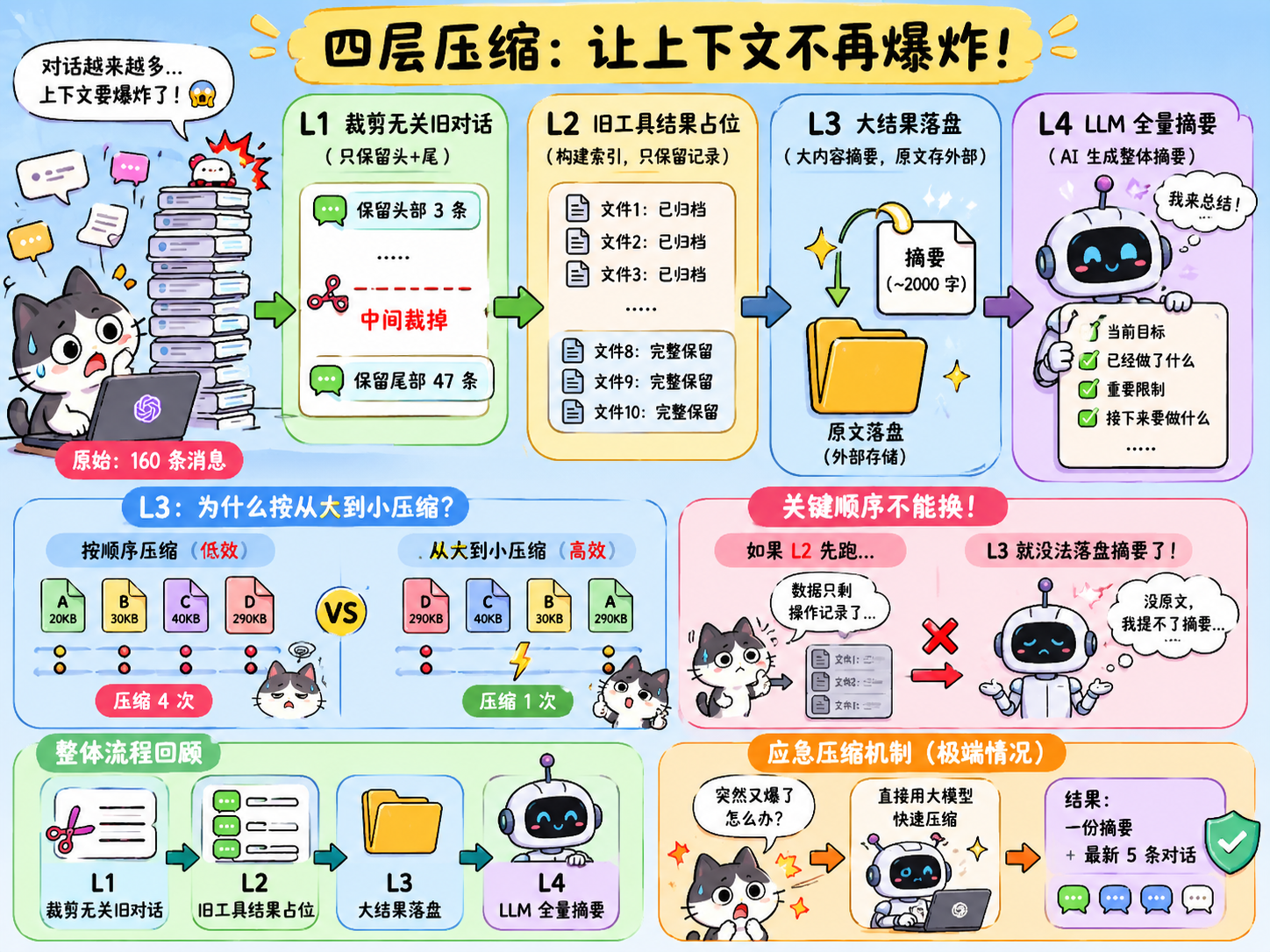
Suppose the Agent has run 80 rounds of conversation,messages accumulating 160 messages. In reality there is a very high chance that the very first "help me create hello.py" is almost unrelated to the current work, yet still occupies space. L1 spots this problem, so when the message count exceeds 50 → keep the first 3 (initial context) and the last 47 (current work), and cut out the middle — meaning there are always only 50 messages, and any excess is removed from the middle.
But note: whole messages are cut, yet the remaining messages' tool_result content still accumulates — for example, message 34 may hold 30KB of old file content, which can still occupy a huge context. This information then needs L2 to handle.
L2: Placeholder for old tool results
L2 specifically handles old tool results, in a way similar to building an indexing mechanism.
For example, suppose the Agent in recent conversation called a document-viewing tool 10 times; after L1 compression, these tool call results are still not compressed, still like this:
文件1 全文
文件2 全文
文件3 全文
文件4 全文
文件5 全文
文件6 全文
文件7 全文
文件8 全文
文件9 全文
文件10 全文
The full text of 10 files in context is simply a disaster! So L2 handles it like this: it builds an index-like mechanism, very similar to Skill's progressive disclosure, except Skill is external and queried when needed, while this is built-in and reopened when needed, keeping only a record of what operations I have called. However, L2 does not compress the content of the most recent 3 conversations, to ensure efficiency.
文件1:已归档,需要再读请重新打开
文件2:已归档,需要再读请重新打开
文件3:已归档,需要再读请重新打开
文件4:已归档,需要再读请重新打开
文件5:已归档,需要再读请重新打开
文件6:已归档,需要再读请重新打开
文件7:已归档,需要再读请重新打开

文件8:完整保留
文件9:完整保留
文件10:完整保留
In this way, full text can be compressed in code to just one line, greatly compressing context. But this is all for the previous case of reading only one small file at a time. What if in a new single conversation I read 10,000 files at once, each with millions of characters? Context explodes immediately, and L2 does not compress new conversations. Don't worry — there is still L3.
L3: Large results written to disk
If L2 compresses context into an operation record and the AI re-executes the operation when needed, then L3 is even closer to skill: it stores these super-huge contents as a short summary, generally 2000 characters. When the model needs it, the actual results are placed elsewhere, and the original text is found by following the summary — very similar to Skill, isn't it?
But that's not all; that alone would not be refined enough. Think about it: if there are 4 files whose combined context size has exceeded the threshold of 200K and needs to be compressed to 200k, in what order should I compress the files?
The answer is to start compressing from the largest file, then the second largest, and so on. Why? To answer this, consider an example.
Suppose there are now 4 files, A, B, C, D, with file sizes as shown below:
A 20KB
B 30KB
C 40KB
D 290KB
We would almost certainly first think of simply compressing in order. Fine, let's try that. Very likely, to reach the 200k compression target, when writing to disk, after A, B and C all enter, compression has not even started, because the three together are only 90K and have not reached 200K. Only when D is written to disk does it suddenly exceed the threshold and trigger compression — that is, the AI has to perform the write-to-disk operation 4 times.
What if we go from largest to smallest? D is written to disk first, immediately exceeds the threshold, and the AI triggers compression directly — only one trigger needed! That is the difference! This is a classic algorithm in computer science — the greedy algorithm, always handling the largest thing first.
Seeing this, I think you understand why L3 must come before L2. As we said above, L2 keeps only an operation record of old content and re-executes it when needed, while L3 writes summaries to disk.If L2 runs first, that data is gone, and L3 simply cannot write to disk and extract summaries.
However, from L1 to L3, none of them actually invoke the LLM's capability; you will notice they all execute based on rule-based judgments. That is, the AI does not actually participate in this compression process, and throughout compression it does not know what was compressed, nor does it understand the content. In some extreme scenarios, the compressed context may still be very large, which requires L4.
L4: Full LLM summarization
L4 is different from the first three layers: it is not triggered by default directly, but only when all three previous layers have run and the token count still exceeds the threshold.
L4 requires AI participation. It is actually quite simple: the AI compresses this part of the content into a text summary itself, for example:
当前目标:正在改登录页
已经做了:改了按钮、修了弹窗、统一了紫色风格
重要限制:不要暗色,不要复杂,不要加文字
已改文件:Login.tsx、Button.tsx
接下来:检查移动端适配
Then it stores a backup of the complete chat, placed intranscript inside.
The complete procedure is divided into three steps:
Back up the complete chat record and place it in the file just mentioned;
Have the AI summarize it into a summary;
Replace the previous complete chat record with this summary.
Then a circuit-breaker mechanism is added here: if the AI fails to compress three times in a row (e.g. due to network issues), compression stops immediately to prevent meaningless token consumption.
Emergency compression mechanism
If L4 fails, or if after L4 compression the context is still exceeded, then only emergency compression remains as the "fallback".
This emergency compression mechanism directly uses the LLM to compress. The final result is: one summary (still one summary, but far harsher and more aggressive in compression and streamlining than L4) + the latest 5 conversations, keeping the newest to prevent the AI from completely "losing its memory".
Comic illustration
If you find this content very dry and hard to understand, take a look at this comic, where I use ChatGPT to explain the problem with both pictures and text:
84 likes
You can like once today