"Compression loses details, so you need a layer that doesn't" — file repository + index + on-demand loading, across compactions and across sessions.
The problem
In the previous article we explained how to compress context, but compression loses a lot of detail. For example, "use tabs not spaces for indentation" might get simplified to "the user has code style preferences." And when a new session starts, even the summary is gone.
LLMs have no persistent state; all information lives in the context window. When the context fills up it must be compressed, and compression is lossy. You need a layer of storage that doesn't participate in compression and is retained across sessions.
Is there a way to solve this? Yes, there is! In this article we'll introduce that part — the memory pipeline.
The solution

Compared with before, the main change here is that a memory module has been added into the Loop cycle, and the LLM's results also affect the contents of this module. The storage for this memory uses the file system under the.memory/ directory, one .md file per memory, with YAML frontmatter (name / description / type). When there are many files they become hard to find, so an index is also needed: MEMORY.md one link per line, injected into SYSTEM, just like the Spotlight feature Mac users love most.
We all know humans have short-term memory, long-term memory, sensory memory, and many other kinds of memory — and AI is the same!
Type | Answers | Example |
|---|---|---|
user | Who you are | "Use tabs not spaces" |
feedback | How to do things | "Don't mock the database" |
project | What's happening now | "The auth rewrite is compliance-driven" |
reference | Where to find things | "The pipeline bug is in Linear INGEST" |
In addition, the index resides in the SYSTEM prompt (and can be cached by prompt cache), while file contents are injected on demand into the current user turn (matching the current conversation by filename/description, without breaking the cache). Writes are done by an extractor after each round ends: when the user explicitly says "remember" or expresses a stable preference, the extractor saves it as a memory. As files accumulate, they are periodically organized and deduplicated.
How it works
Building memories
As I said above, this works like the Spotlight search Mac users love — it uses an index to achieve fast and accurate memory retrieval.
Memory storage
To humans, memory is a special kind of neural electrical signal; to AI, each memory is a .md file, with YAML frontmatter recording metadata:
---
name: user-preference-tabs
description: User prefers tabs for indentation
type: user
---

User prefers using tabs, not spaces, for indentation.
**Why:** Consistency with existing codebase conventions.
**How to apply:** Always use tabs when writing or editing files.
The memory index
In memory there is a file calledMEMORY.md — this is the index file, one link per line:
- [user-preference-tabs](user-preference-tabs.md) — User prefers tabs for indentationLike any other index, whenever new content comes in, the index is rebuilt.
Loading memories
There are generally 2 paths for loading memories: the resident index and on-demand injection.
Index resident in the system prompt
That is, on every conversation the index file mentioned above enters the system prompt so the AI can access it. However, to save token usage, this part can be cached, so it only needs to be loaded once per conversation.
Relevant memories injected on demand
Before each round of calls, the most recent conversation and the memory catalog (including name and description) are first sent to the AI for a very simple small generation that selects relevant files — essentially the same skill approach: if there's a match, look at the original text; if not, skip it.
Usually, to save cost, at most the latest 5 conversation entries are injected, never more.
I believe you noticed from the L4 compression of large models in the previous article that anything involving model operations needs a good error-handling mechanism. Here, if this simple side-query fails, it degrades to keyword matching.
Writing new memories
As mentioned, new memories rebuild the index — so when should new memories be written? Must the user always actively say "remember xxx" every time?
The answer is no. Memory writes happen at the end of every conversation round, that is, when the loop exits without calling a tool again.
Before extraction, existing memories are checked to avoid duplication. The extraction prompt requires the LLM to return {name, type, description, body} as a JSON array, and a file is only written when there is genuinely new information.
Organizing memories
Memories keep accumulating as conversations grow — so what do we do? Just watch it turn into a pile of mess? Of course not!
consolidate_memories() It triggers when the file count reaches a threshold (default 10), having the LLM deduplicate, merge contradictions, and retire outdated memories. CC calls this process Dream; it actually has four layers of gating: time interval, scan throttling, session count, and file lock. Here we simplify it to a file-count threshold.
What memories are good for
Memory stores information that remains useful across sessions: user preferences, recurring feedback, project background, common entry points, and troubleshooting clues. It focuses on "what will still be used later" and brings this information back into the current conversation through index + on-demand loading.
Session memory focuses on continuity within a single session: after compact, what context the current session still needs to retain. The two work together: Memory manages long-term knowledge, session memory manages compressed continuation of the current session.
CC's memory module
CC's memory feature is much more complex than what we described above, mainly in the following differences.
AI chooses memories instead of relying on an index
CC uses the AI itself to select memories, rather than retrieving via an index as we just described — which is essentially matching vector similarity, i.e. RAG embeddings. The steps are:
memoryScan.tsScan all.memory/files under.md(excluding MEMORY.md), up to 200, sorted by update time from newest to oldest;Extract each file's name and description into a list;
Send to Sonnet side-query: "Select the genuinely useful memories based on name and description (at most 5). If unsure, don't select."
Sonnet returns
{ selected_memories: ["file1.md", ...] }this list, indicating which ones were picked;Read the full contents of the selected files (≤ 200 lines / 4096 bytes per file) and inject into context. Total budget per session 60KB
The Dream mechanism
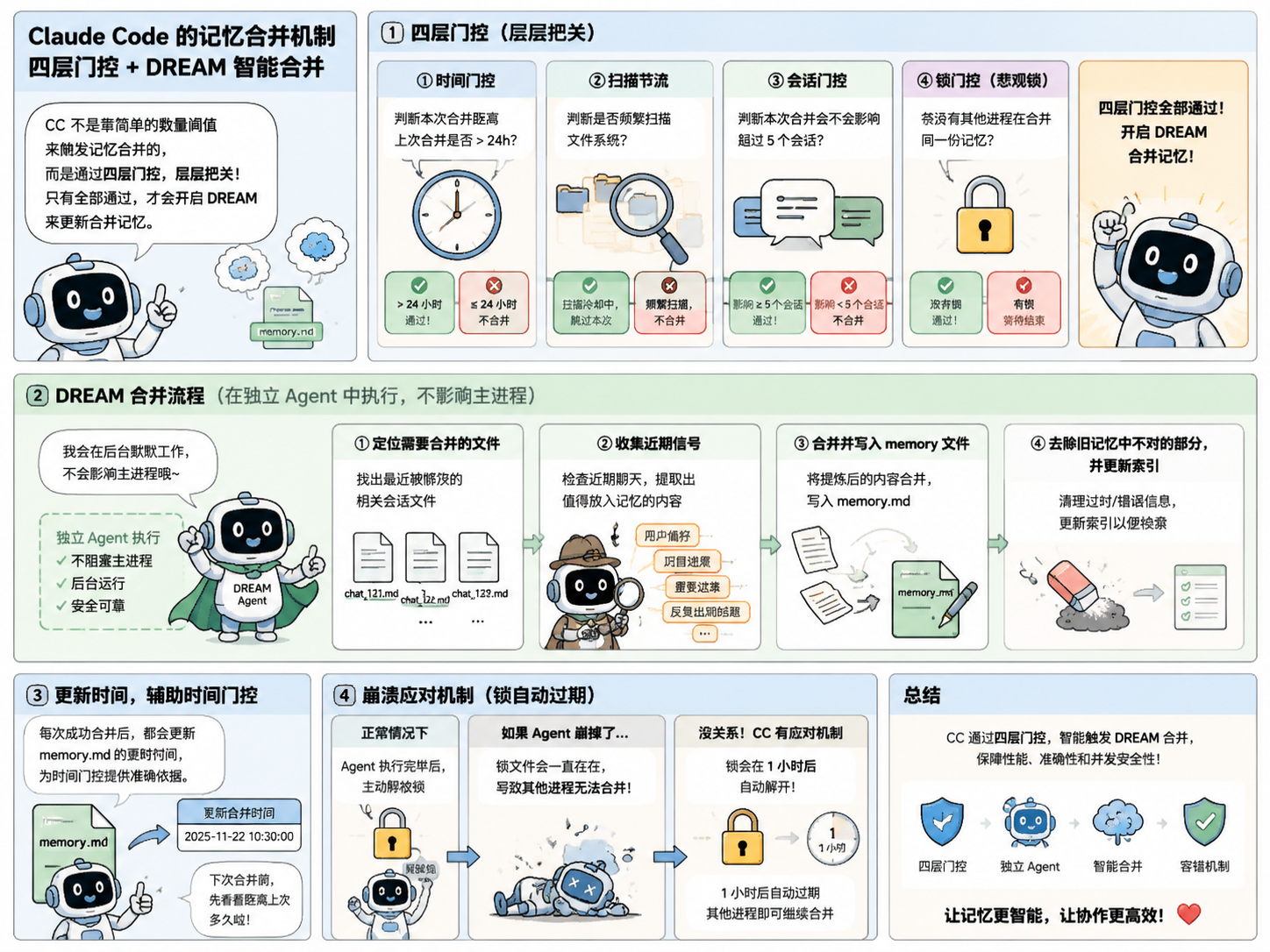
This is the processing mechanism CC uses for adding, merging, and deduplicating memories, as just mentioned. It is not triggered by a simple count threshold, but implemented via a very complex four-layer gating:
Time gating: check whether this merge is more than 24 hours after the last merge; if less, don't merge;
Scan throttling: check whether the file system is being scanned frequently, to avoid performance impact from frequent scans once there are many memories;
Session gating: check whether this merge would affect more than 5 sessions; if fewer than 5, don't merge;
Lock gating: whether another process is merging the same memory — this is a pessimistic lock; if another process is merging, wait for it to finish before merging.
Only after passing these four layers of gating can DREAM be started to update and merge memories. There are also a few things to note here:
In CC, this memory update is done by a dedicated Agent and does not affect the main process;
The whole flow is:
Locate which files need merging;
Collect recent signals, checking recent chats for anything that can go into memory;
Merge and write into the memory file;
Remove incorrect parts of the old memories and update the index;
Each update also modifies the update time, to help with time-gating decisions;
Still the same issue: anything involving AI operations needs error handling. If the Agent crashes but the lock prevents other processes from writing, isn't it over? No problem — CC adds a fallback mechanism: if the Agent really crashes, the lock automatically releases after 1 hour, allowing other processes to write after that.
The DREAM mechanism is indeed one of CC's more complex things. I made a little comic to help you understand:
22 likes
You can like once today