"Prompts are assembled, not hardcoded" — segmented + on-demand concatenation + caching.
👳🏻♂️ This topic comes a bit late, because the original article was written by adding bricks to the process step by step, but as foundational content it involves a lot of basic knowledge from earlier. If you have earlier sections about the system prompt, you can jump here.
The Problem
For a long time, we all thought the system prompt was just a preset block of text, plus things we learned earlier like memory, the Skill directory, and so on.
But this has problems:
Prompts aren't reusable: different projects require different prompts, and how exactly to change them to keep the AI from making mistakes is a black box — there's no stable conclusion to be had;
Changing one place can affect everything: once the prompt gets long, adding a tool description can, oh man, conflict with what was there before;
Every request has to carry the whole thing: this is the most annoying part. Every time I have to drag along this whole string of stuff, and not all of it is actually used — it wastes a ton of context and tokens, and overlong prompts also tend to make the AI lose focus;
The system prompt should be a configuration assembled at runtime based on the current state: which tools are enabled, which context is visible, which memories are relevant, and which content must stay stable to hit the prompt cache.
🌂 Let's add a note on what this prompt cache is. It's essentially the AI's prompt cache — like browser cache, a temporary store. The benefit is fast loading, so it doesn't have to be reloaded every time; the AI only needs to read it once, rather than re-reading it every round in the loop of the same conversation and wasting tokens.
The Solution
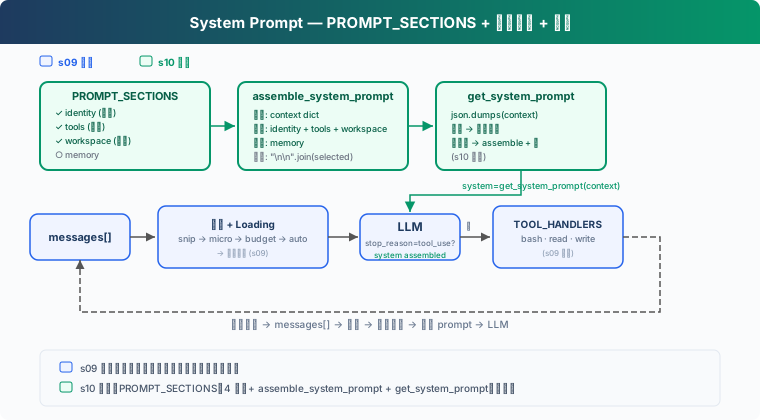
Compared to before, there's actually an extra prompt-assembly step, technically called splitting into several sections and then concatenating on demand. Sections have different types and content, and their loading strategies differ too. In any case, whether a section loads depends on the real state (whether the tool exists, whether the file exists), not on keywords in the message.
Section | Loading Strategy | Content | Criterion |
|---|---|---|---|
identity | Always | Who you are, how you work | Always present |
tools | Always | List of available tools |
|
workspace | Always | Working directory | Always present |
memory | On demand | Relevant memory content |
|
How It Works
Segmented definition is essentially modular engineering assembly: make the prompt into several modular pieces and flexibly assemble them in actual use, just like the microservices architecture backends used to love.
Segment Definition
Since it's modular, you have to tell the AI what modules exist, what they're called, and what they contain. Split a big string into a dictionary, each key being a topic:
PROMPT_SECTIONS = {
    "identity": "You are a coding agent. Act, don't explain.",
    "tools": "Available tools: bash, read_file, write_file.",
    "workspace": f"Working directory: {WORKDIR}",
    "memory": "Relevant memories are injected below when available.",
}
Each section is maintained independently. For example, modifying tools doesn't affect identity, and adding memory leaves workspace untouched.
On-Demand Concatenation
As mentioned at the start, not every section is needed every time in a conversation. If there's no memory file right now, loading the memory section just wastes tokens. Decide which to load based on the real state of the context; in code, it's just an if condition:
def assemble_system_prompt(context: dict) -> str:
    sections = []

    # 始终加载
    sections.append(PROMPT_SECTIONS["identity"])
    sections.append(PROMPT_SECTIONS["tools"])
    sections.append(PROMPT_SECTIONS["workspace"])

    # 按需加载 — 基于真实状态,不是关键词
    memories = context.get("memories", "")
    if memories:
        sections.append(f"Relevant memories:\n{memories}")

    return "\n\n".join(sections)
"Always loaded" ones are needed every round: identity, tools, working directory. "On-demand" ones are only useful under specific conditions.
Caching Mechanism
⚠️ One thing to clarify about caching: it doesn't just mean multiple user turns, and certainly not user turns across threads — it means that after a single user turn, each round the AI loops through inside the agent loop can use the cache.
In a single loop, no matter how many times the AI calls, apart from the first time, the subsequent system prompts would need re-concatenation and re-reading, but instead they hit the cache and are read directly.
Update Method
So since within the same loop, as long as the context hasn't changed, I don't reassemble — how do I tell whether it changed and needs reassembly?
That's by using a context object function that reflects the real runtime state and lists the actually registered tools, memory checks, etc. Each round in the loop checks the context; if it changed, reassemble; if not, use the cache.
The System Prompt in CC
CC differs from what's described above: it's not simply assembly, and it's not just 4 sections — it's a variable number of states, and overall divided into 3 categories:
Static sections: the sections that are always loaded;
Dynamic sections: loaded according to state, i.e. on-demand sections.
Volatile sections: only MCP is this kind, meaning it can be used for two rounds in a row but one time disconnected and one time enabled.
Because volatile sections are so special and only MCP is one, we won't mention them further.
Caching Strategy for Dynamic and Static Sections
Following CC's approach, a prompt can be seen as a combination of a static section group and a dynamic section group. To make it easier for the AI to distinguish them, CC inserts a SYSTEM_PROMPT_DYNAMIC_BOUNDARY marker between the dynamic and static groups, which turns the prompt into:
[静态部分]
你是 Claude Code
工具说明
Agent说明
...

===== BOUNDARY =====

[动态部分]
git status
当前时间
memory
This way the AI knows at once: ah, everything above this is static section prompt text, and below is dynamic, so static prompt text can take part in caching while dynamic prompt text doesn't.
90 likes
You can like once today