"Slow operations go to the background, the agent keeps processing" — a background thread runs the command, and a notification is injected when it completes.
The problem
Do you remember the asynchronous and synchronous tasks mentioned earlier? Back then we made an analogy: you put your clothes in the washing machine, press start, and then go do something else — cook, reply to messages, read papers. 30 minutes later the washing machine goes "beep beep beep" to remind you: done. You wouldn't just stand in front of the washing machine waiting for 30 minutes; or, when we now have AI do work for us and it takes a long time, we can scroll on our phones :)
The Agent's bash tool is the same.pip install torch takes 10 minutes, npm run build takes 3 minutes. Once these commands start running, the Agent is waiting for the bash tool to return and cannot use this time to handle other tasks. The Agent waits 10 minutes doing nothing, while the LLM is billed by token, so idling is a waste.
The solution
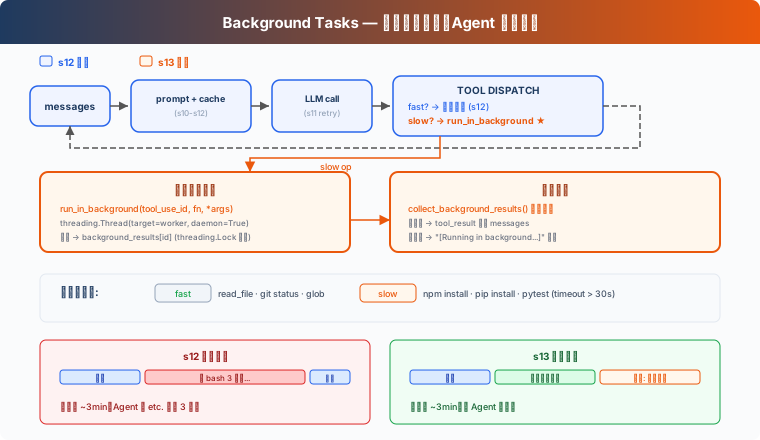
This diagram actually simplifies the previous flow a bit; let's just assume that whatever isn't drawn is still there. As you can see, it essentially adds a new check that determines whether task execution is fast or slow. If fast, it continues to execute synchronously; if slow, it executes in the background asynchronously.
It's actually the same as the task center module that many of our paid-task products have today, such as uploads, downloads, and so on.
Synchronous (s12) | Background (s13) | |
|---|---|---|
Slow operation | Agent waits idly | Background thread execution |
Agent idle | Yes | No, keeps processing |
Result | Returned immediately | Notification injected in the next round |
Decision criterion | — |
|
How it works
Explicit start takes priority
The model explicitly requests background execution through the bash tool's run_in_background parameter. CC does not use simple keyword-based heuristic fallback; instead, it provides a boolean parameter that lets the AI decide which commands to hand off to the background task center. That is, in this step CC relies on the AI, not simple keyword matching.
Entering the loop again
Now that execution is in the background, how does the AI get notified when it finishes? This requires a notification system to tell the AI that this background task has completed, just like a task center.
Then, when it completes, a new tooluse record is created, and in the loop the notification and result are merged and inserted back into the loop.
63 likes
You can like once today