"Produce work on a schedule, decoupling scheduling from execution" — cron scheduling, persistent or session-level.
If you know the Vibe coding circle, you'll know that the most common products in it are calendars, schedule managers, and todo tools. Even though they're terrible, they still show how important time management and planning are to everyone. The same goes for AI: ideally, it would also have a schedule to work from.
The Problem
An alarm clock doesn't need you to stare at it for it to ring. You set it for 7:00, and when the time comes it rings on its own—whether you're sleeping, showering, or cooking, it rings all the same.
In the previous article, we used the background async task module to let the Agent perform slow operations in the background, but all operations were still triggered manually by you. You say something, and the Agent takes one action. "Run tests every day at 9 AM," "check CI status every 30 minutes"—these periodic tasks shouldn't require a person to push them each time.
The Solution

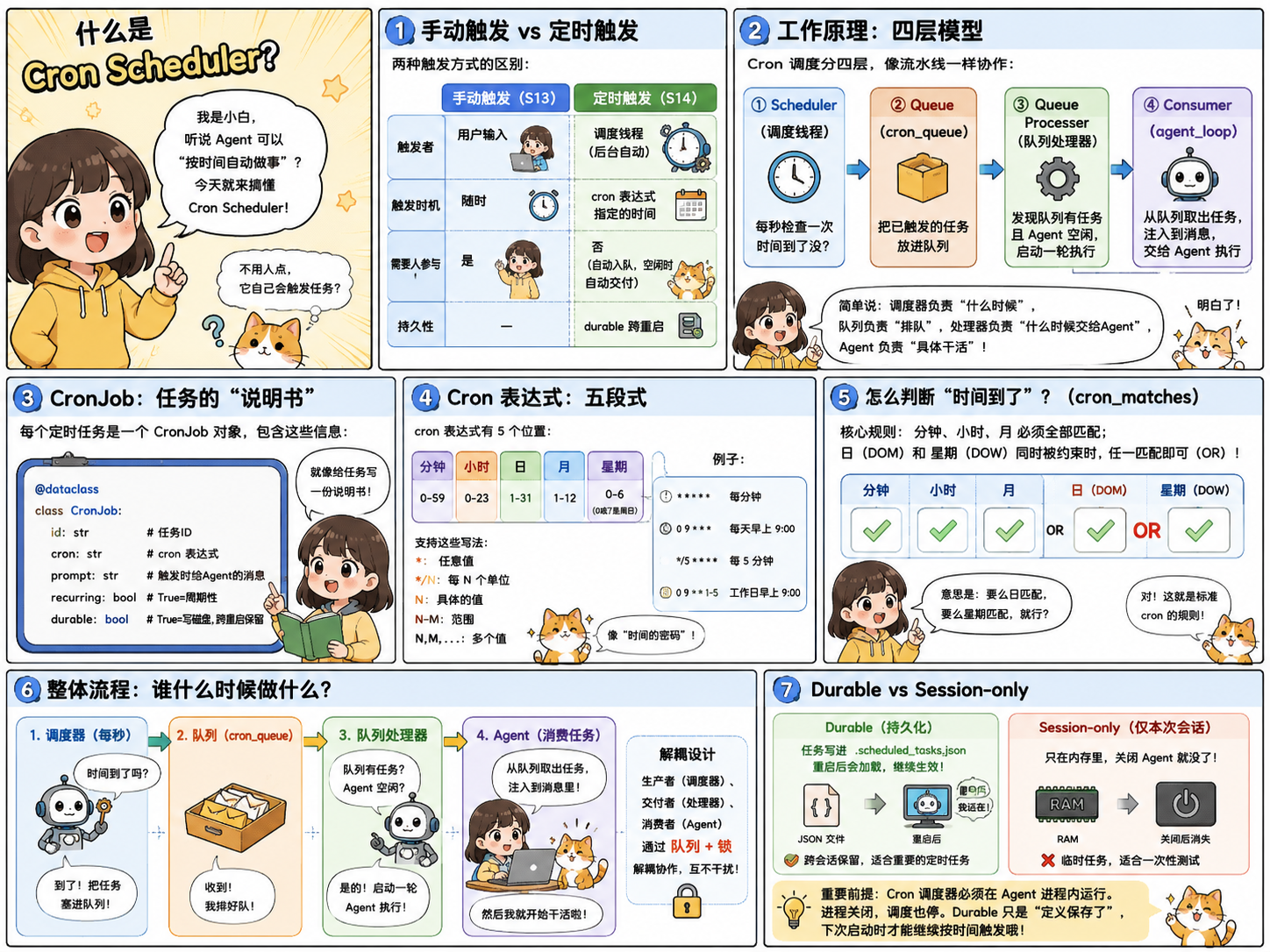
If you've had even a little exposure to operations-related business or products, you'll know that cronjob in devops products means scheduled tasks. So really, it's about adding a scheduled task module before the message starting point (since a loop-type process starts with message input), so you add a module that sends message content on a schedule to get the loop running.
However, note that these kinds of scheduled tasks all execute in the background — which is also why we introduced the previous diagram first, and then this one.
Manual trigger | Scheduled trigger | |
|---|---|---|
Triggered by | User input | Scheduler thread |
Trigger timing | Anytime | Specified by cron expression |
Requires human involvement | Yes | No (the scheduler enqueues automatically and delivers automatically when idle) |
Durability | — | durable across restarts |
How it works
The four-layer division of labor in the cron scheduler is fairly complex, so I'll give a brief introduction here:
Layer | Function | Description |
|---|---|---|
Scheduler (scheduling thread) | Checks the time every second | When the time comes, puts the corresponding task into |
Queue | Stores tasks pending execution | The scheduling thread drops triggered tasks here and waits for an Agent to become idle before executing them |
Queue Processor (delivery side) | Check queue & Agent status | When the Agent is idle, pull queue tasks and start executing |
Consumer(Agent loop) | Actually execute the task | Inject the task into the Agent's messages so the Agent does the work |
Simply put, the scheduling thread means that when the alarm goes off, it is time to get to work; the queue means that there are many people who want to do this work, so you have to wait in line for your turn to do it; the delivery side means that the foreman is no longer busy and starts letting the people who were just queuing begin to work; and the Agent loop means that our loop is where the task actually starts to execute.
He split the whole process into 4 parts to do it, all for the sake of safety—splitting an important matter among three or three people so that each has part of the authority, but no single person holds all the authority, so it will not collapse all at once.
86 likes
You can like once today