"If one can't handle it, team up" — file inbox + teammate threads.
The Problem
Suppose there's a super complex task right now — refactoring the entire backend, involving the auth module, database layer, API routes, and tests.
When one Agent is fixing API routes, the details of the auth module are no longer in the context. The context window is only so big, and a single Agent's attention can't cover all modules.
The Subagent we introduced earlier is a temp worker — you call it in to do one thing and it leaves. But some tasks require teammates that can communicate and collaborate — that's Agent teams.
The Solution

This time it's a bit more complex — a big chunk has been added to the previous flow. Don't be afraid, don't rush, we'll go through it step by step. Overall, it's just 3 things added.
MessageBus: it's the file inbox;
Spawn_teammate_thread: starts a teammate thread, meaning it summons a teammate to help;
Inbox injection: receives teammate messages and injects them into history (just think of it as the context).
You'll notice it's basically an office OA tool. You're doing design work, suddenly realize you can't finish something, so you quickly find another designer or other designers to come help you. Everyone is within one company, messaging each other in the OA, and the messages are synced and reported to you, and then you record in other tools like Jira that one by one they've been completed.
Differences from Subagent
So here's the question: compared with subagent, what exactly is the difference? Simply put, it can be divided into the following 3 points:
Subagent | Teammate Agent | |
|---|---|---|
Lifecycle | One-time, destroyed after use | Multi-round (teaching version limited to 10 rounds, real CC uses idle loop) |
Communication | Only returns conclusions | Asynchronous inbox, communicate at any time |
Context | Fully isolated | Shares information via messages |
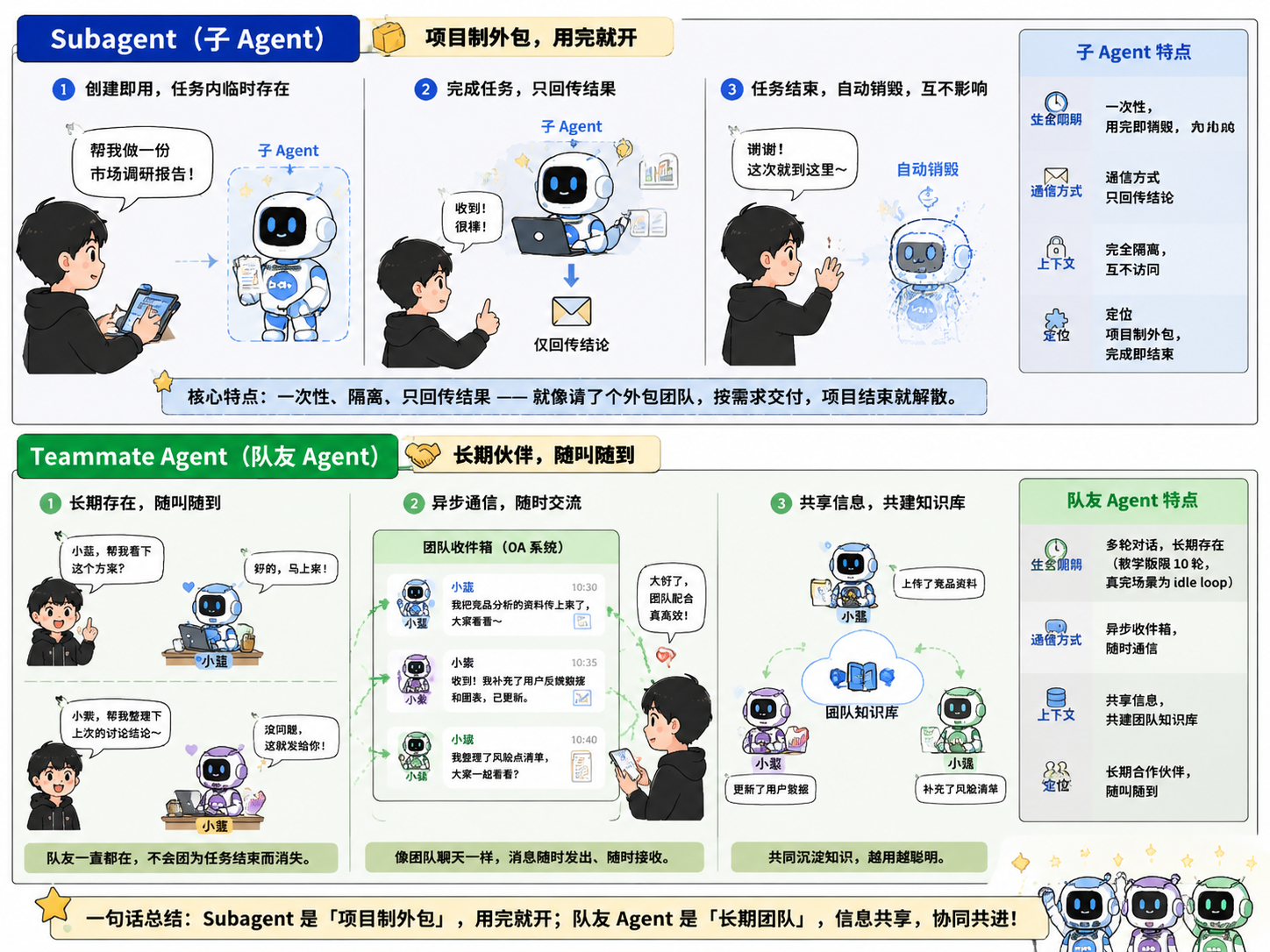
A Subagent is only created for the current task and is destroyed after completion — it's project-based outsourcing, you can let it go after use; but a teammate Agent doesn't work that way — it's your on-call partner, normally you each do your own work, and when needed you call it over to work together;
As we introduced before, a Subagent only passes results to the main Agent, but teammate Agents are like having an OA system between them, chatting with each other. Correspondingly, whether between Subagents or with the main Agent, contexts are isolated from each other, but teammate Agents can share information, like a team knowledge base.
How It Works
MessageBus Inbox
Each Agent (including the Lead and teammates) has a .jsonl mailbox. Sending a message means appending a line of JSON to the other party's file. Reading messages is a bit special — it's "burn after reading" style, i.e., read file + delete (consumption-based), meaning an Agent will only get that message once, and other Agents won't get that message either.
In addition, a conflict-prevention design is also in place hereproper-lockfile. When multiple threads read or write the same inbox at the same time, only one will get the message, and the others won't see it (because it has been deleted).
Spawning Teammates
Unlike a Subagent, a teammate Agent has its own loop cycle, with capability configuration almost identical to the Lead's. After execution, it sends the result to the Lead's inbox, and also communicates with the Lead in real time.
In addition, just like other AI operations, there's a fallback mechanism to prevent error infinite loops. In the teaching article it's set to loop at most 10 times, but CC uses a parameteridle_notification, sending once to the Lead's inbox each round, then waiting for permission before continuing one more loop.
Lead Checking the Inbox
Since everyone is sending messages to the lead's inbox, when should the lead check the messages?
The simplest way, which is the method in the tutorial, is for the lead to check once each loop and respond, putting the results into an external history. But CC does it more like real interaction between people — CC has the Lead check once per second, and if there's any update, adjust immediately, without waiting for the next loop.
Permissions Bubble Up
This is the same as with a Subagent — when a Team agent needs to request permission, it's not the one requesting it, but the Lead that requests it.
Context Compression
Note that this Agent can also have the problem of context overflow, so compression is needed, but its role is fixed — that is, it's part of the context, so it might be compressed away. CC's handling here is that this part of the information is not allowed to be compressed, because it belongs to the System prompt; CC requires this part to be automatically compressed.
44 likes
You can like once today