Each works in its own directory, no interference" — tasks manage goals, worktrees manage directories, bound by ID.
If you've used the worktrees in codex and cc, I think you already know what we're going to cover in this article.
The Problem
In earlier Agent tasks, Alice and Bob both worked in the same directory. Alice's task was "refactor the authentication module", and Bob's task was "refactor the UI login page".
But what if they both need to modify the same file while running at the same time? Wouldn't that blow up? Exactly — that's what isolated workspaces are for, namely worktrees! We previously covered this in detail inThe new god of the current version, codex — everything you need is here! as well!
The Solution
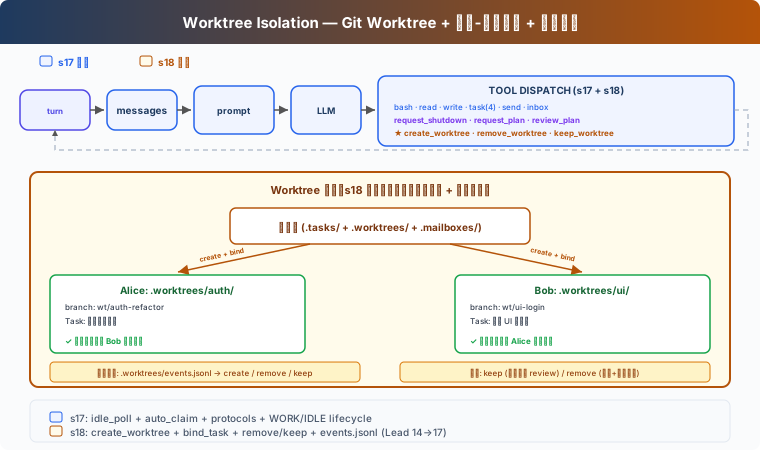
Git worktree lets you create multiple independent working directories in the same repository, each with its own branch. Alice works under .worktrees/auth-refactor/ and Bob works under .worktrees/ui-login/ — no interference.
Capability | Function |
|---|---|
create_worktree | Create an independent directory and an independent branch for a task |
bind_task_to_worktree | Bind a task to a working directory (without changing its state) |
remove_worktree / keep_worktree | Clean up or keep after completion |
validate_worktree_name | Reject path traversal and illegal characters |
How It Works
Creation: binding a task to a worktree
One task is bound to one worktree. Binding does not change the task state — the task remains pending, and only advances to in_progress when a teammate automatically claims it. This way the Lead can create tasks and worktrees in advance, and teammates naturally claim tasks with worktrees when idle. In CC, if you create a Subagent in a worktree, the subagent's workspace is also in the worktree.
Tool path switching
The teaching version maintains a wt_ctx dictionary for each teammate, recording the current worktree path. When a teammate claims a task with a worktree, wt_ctx is automatically set to the worktree path; the teammate's bash, read_file, and write_file execute in the worktree directory. This is also a well-worn topic, so I won't explain it further — almost every introduction to worktrees covers it.
Wrapping up: keep or reject
When this task is complete, there are two choices:
Keep = keep the branch, merge into the main branch after manual review.
Remove = rejected by default when there are changes, requires
discard_changes=trueconfirmation.
That is to say, inside the worktree the Agent won't, like before, commit, send an inbox message, and run off to do something else while automatically completing the task; instead, completion is explicitly triggered by the teammate's complete_task.
61 likes
You can like once today